
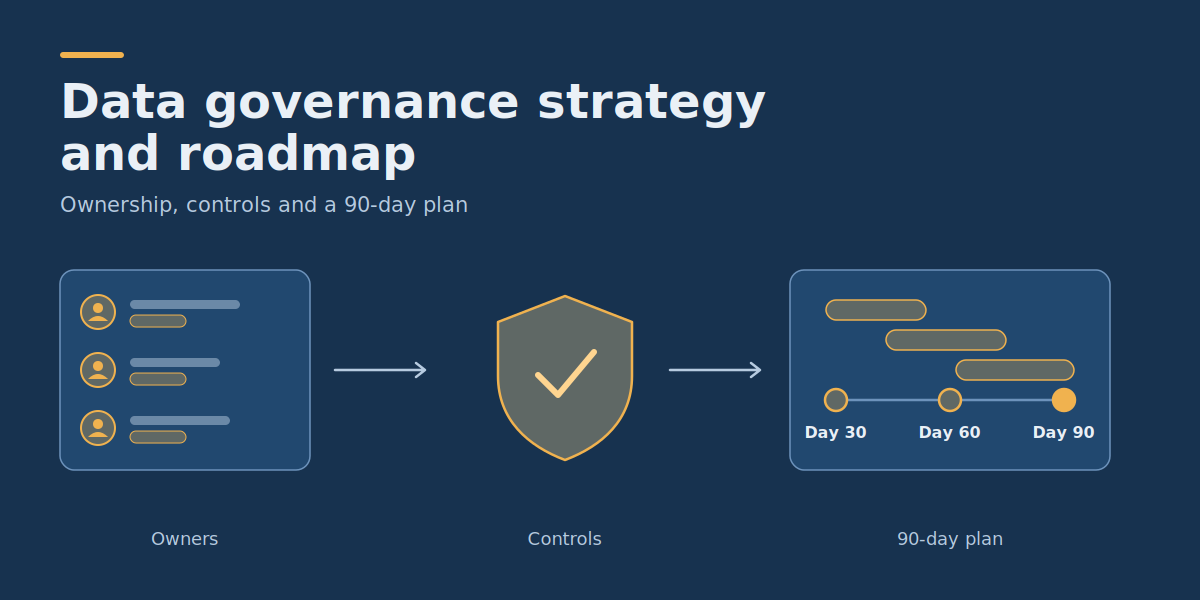
Data Governance Strategy and Roadmap: Ownership, Controls and a 90-Day Plan
What does a practical data governance strategy need?
- Start with the datasets that support important business decisions rather than attempting to govern every record across the organisation.
- Assign a business owner who can approve data definitions and access decisions, supported by people responsible for technical controls and day-to-day quality.
- Establish simple rules for who can access information, which quality checks must pass, how exceptions are resolved, and when records should be reviewed or deleted.
- Keep governance evidence lightweight: a data inventory, ownership matrix, short policy checklist, access-review log, and issue register may be sufficient for an initial rollout.
- Use a 30/60/90-day roadmap to introduce controls into one real workflow, test whether employees can follow them, and expand only when they prove useful.
A data governance strategy and roadmap defines who can make decisions about business information, what rules apply to its use, and how those rules become part of everyday operations. Its purpose is to make data trustworthy and appropriately accessible without creating unnecessary approval delays or administrative work.
For business data owners and IT leaders, the challenge is often finding the right balance. Employees need access to information for reporting and decision-making, while the organisation must prevent unauthorised use, inconsistent calculations, and unresolved quality problems.
The most practical starting point is minimal governance for one important workflow: identify its datasets, assign decision rights, implement necessary controls, document exceptions, and measure the results. This guide includes a completed ownership matrix, an actionable policy checklist, a sample access-review log, and a 90-day implementation plan that can be adapted to an organisation’s existing systems.
1. Inventory the data that matters to business decisions
Data governance starts with understanding which information the organisation relies on. An inventory identifies important datasets, their business purpose, location, owner, sensitivity, and dependencies.
You do not need to catalogue every file before making progress. Begin with a business process that currently suffers from disputed reports, confusing access permissions, or recurring data quality problems. Microsoft’s Fabric adoption roadmap guidance on governance makes the same point in a more direct way: an organisation cannot govern data assets it does not know about, so understanding critical assets and their ownership comes first. It also advises working on one data domain or business unit at a time.
Worked example: governing commercial reporting
Consider a hypothetical business with 70 employees. Its finance, sales, and customer support teams use several applications to understand revenue, customer activity, and operational performance.
The company has three recurring problems:
- Finance and sales reports sometimes display different revenue figures.
- Employees retain access to customer information after changing roles.
- Reporting errors are discussed informally, with no designated person responsible for resolution.
Rather than launching an organisation-wide governance programme, leadership chooses commercial reporting as its first governed workflow.
The initial data inventory could look like this:
| Dataset | Business purpose | Source | Business owner | Key risk |
| Customer accounts | Identify customers and report commercial activity. | CRM | Sales operations manager | Duplicate identities and excessive access |
| Invoices and refunds | Calculate approved financial measures. | Finance system | Finance controller | Incorrect reconciliation and sensitive financial information |
| Support requests | Monitor service activity and identify customer issues. | Support platform | Support manager | Exposure of customer conversations and inconsistent account matching |
| Commercial dashboard | Provide agreed KPIs for leadership reviews. | BI reporting model | Finance controller | Unapproved metric changes and inappropriate sharing |
These are illustrative assignments, not descriptions of a real client organisation.
For each dataset, record where it originates, who uses it, what information it contains, and which business decision depends on it. Note whether it contains personal, financial, confidential, or otherwise restricted information requiring additional controls.
A spreadsheet or existing documentation system is sufficient for this initial inventory. A dedicated data catalogue becomes more attractive when the organisation has enough datasets, users, and relationships to justify the additional system.
Acceptance condition: Every dataset required for the selected reporting workflow has an identified source, business purpose, owner, sensitivity classification, and known downstream use.
2. Assign data owners and make decision rights explicit
Data ownership means someone has authority and accountability for decisions about a dataset’s business meaning, appropriate use, and required quality. It does not mean that one person must personally maintain every technical component containing that information.
Confusion often arises because organisations use the terms data owner, data steward, system administrator, and report owner interchangeably.
These responsibilities should be separated where necessary:
- Business data owner: Approves definitions, permitted business uses, quality requirements, and relevant access decisions.
- Data steward or operational owner: Coordinates quality checks, investigates discrepancies, and works with source-system teams on corrections.
- Technical custodian: Implements approved permissions, integrations, monitoring, backups, and other technical controls.
- Report owner: Maintains a particular analytical output and ensures its published calculations and intended audience remain appropriate.
- Security or privacy specialist: Advises on applicable requirements and reviews issues within their authority.
In a small company, one employee may hold multiple responsibilities. The important distinction is knowing who makes a business decision and who implements it. Microsoft’s governance guidance takes the same view of roles: terminology and team structure vary widely between organisations, and the same person can serve several roles. It also recommends naming a backup for each person in a key role so that time-sensitive decisions are not blocked by an absence.
Completed data governance ownership matrix
Use the following matrix as a starting artifact. It identifies the accountable decision-maker, the person performing the work, and the escalation route for important activities.
| Decision or activity | Accountable decision-maker | Responsible for execution | Escalation route |
| Approve the definition of net revenue | Finance controller | BI analyst implements approved calculation | Finance director |
| Correct duplicate CRM customer records | Sales operations manager | CRM administrator or data steward | Commercial director |
| Approve access to detailed customer data | Customer data owner | IT administrator provisions approved permissions | Security/privacy owner for unresolved concerns |
| Change a shared dashboard calculation | Relevant business metric owner | BI developer | Executive sponsor if owners disagree |
| Investigate failed financial reconciliation | Finance controller | Data steward and data engineer | Finance director |
| Approve an exception to a governance rule | Designated policy owner, subject to required specialist approvals | Assigned technical or operational owner | Risk, security, legal, or leadership function as appropriate |
The matrix should contain actual role holders in the organisation’s working copy. If a critical decision requires two independent approvals, record both instead of assigning authority to whichever employee happens to receive the request.
Microsoft’s governance guidance also stresses that someone must hold enough influence over governance decisions to enforce them across organisational boundaries, and that decisions about what users can and cannot do should not be left to a system administrator alone. Although the guidance is written for Fabric and BI adoption, these principles apply to everyday data ownership decisions.
Who owns data quality?
The business data owner should be accountable for defining acceptable quality and deciding whether a dataset is fit for the intended business purpose. The steward or operational team investigates and coordinates corrections, while technical staff maintain the checks and processing mechanisms.
For example, a finance controller determines whether unresolved refund discrepancies make a revenue report unsuitable for publication. A data engineer can identify the failing records and correct a broken transformation, but should not independently redefine revenue to make reconciliation pass.
Acceptance condition: Every critical data quality or access issue has a named decision-maker, an execution owner, and an escalation route.
3. Define data access rules without slowing legitimate work
Access governance determines who can read, modify, export, or share information and under which conditions.
The objective is not to make every data request pass through several committees. It is to provide an understandable route to appropriate access while preventing unnecessary privileges. Microsoft’s guidance frames this as a “yes, and” approach rather than a default “no”: new data requests should meet clear, simple, transparent rules for access, usage, and sharing, so that people have no reason to work around them.
Start by separating data into a small number of practical handling categories.
Example data classification and access policy
| Classification | Example information | Default handling rule | Approval |
| Public | Approved published reports and marketing information | May be shared through approved public channels. | Content or publication owner |
| Internal | General operational summaries without restricted details | Available to authorised employees for legitimate internal work. | Relevant team or data owner |
| Confidential | Customer details, non-public pricing, and detailed commercial information | Restricted to approved roles and defined business purposes. | Business data owner |
| Restricted | Highly sensitive personal information, credentials, or sensitive financial records | Explicit permission, stronger safeguards, and narrowly limited processing. | Authorised data owner plus any required security or privacy approval |
These categories are an example policy, not a universal regulatory classification system. A company should align them with its existing legal, contractual, security, and operational requirements. Microsoft’s guidance supports this proportional approach: data that contains personally identifiable information or is subject to regulation should face stricter requirements than less sensitive data, and so should content considered critical, such as reports delivered to executives.
Once categories are agreed, apply role-based permissions where suitable. A sales analyst may require aggregate revenue trends without needing access to individual employees’ compensation information or every customer support conversation.
Make access requests easy to approve and review
A minimal access request should identify the employee or service, dataset, business purpose, required permission, approving owner, and review or expiry condition.
Access should be provisioned through the systems that enforce permissions. A spreadsheet documenting approval is not itself an access control.
For temporary work, use time-limited access where supported. When an employee changes responsibilities, the relevant permissions should be reviewed rather than simply accumulating.
When approvals still travel through email threads and shared spreadsheets, some teams look at custom software development for business workflows to route requests, record decisions, and trigger reviews inside the tools people already use. This is worth considering only after the manual process has been tested and the rules are stable.
Worked minimal access-review log
The following is a completed illustrative log for the hypothetical business. It can be copied into a spreadsheet or existing ticketing system.
| Request / review ID | Identity and dataset | Purpose and permission | Decision and approver | Review date / action |
| AR-001 | Sales Analyst A — CRM customer summary | Read approved customer segments for monthly reporting | Approved by sales operations manager | Review after 90 days; confirm continuing role need |
| AR-002 | Finance Analyst B — invoice records | Read finance records needed for monthly reconciliation | Approved by finance controller | Review after 90 days; retain only necessary scope |
| AR-003 | Marketing Contractor C — full customer export | Requested unrestricted export for a campaign | Denied by customer data owner | Propose a limited, approved audience extract instead |
| AR-004 | Former Support Analyst D — support conversation archive | Review existing access after department transfer | Revocation approved by support manager | Remove access and verify the change was applied |
The 90-day review intervals above are illustrative access-control choices, not legal retention periods or universal security requirements.
For each log entry, preserve the decision, approver, date, implementation status, and evidence that the permission was granted or revoked. The final review should confirm the actual access state, not merely that someone marked a request as approved.
Acceptance condition: Users can request legitimate access through a documented process, and permissions for the pilot datasets can be traced to a valid approval and verified in the relevant systems.
4. Establish data quality checks linked to real decisions
Quality governance should focus on whether data is suitable for its intended use. A dataset can have valid field formats while still producing incorrect business conclusions because records are missing, duplicated, outdated, or interpreted inconsistently.
For the commercial reporting example, begin with four checks:
| Quality control | Validation rule | Owner and failure response |
| Required identifiers | Every included invoice has the required invoice and customer identifiers. | Finance operations investigates missing records before publication. |
| Duplicate prevention | The same source invoice cannot contribute twice to an aggregate through a duplicate import. | Data engineer investigates processing defects; finance approves any business corrections. |
| Reconciliation | Revenue calculations agree with the approved financial reference under the agreed accounting definitions. | Finance controller evaluates differences and authorises the report’s use. |
| Freshness | Required daily updates complete before the agreed reporting deadline. | Technical owner investigates failure; report shows its last successful refresh. |
Microsoft’s governance guidance lists data quality verification and documentation among the additional requirements that may apply to critical content, which is why these checks target the reports that leadership relies on.
What happens when a quality test fails?
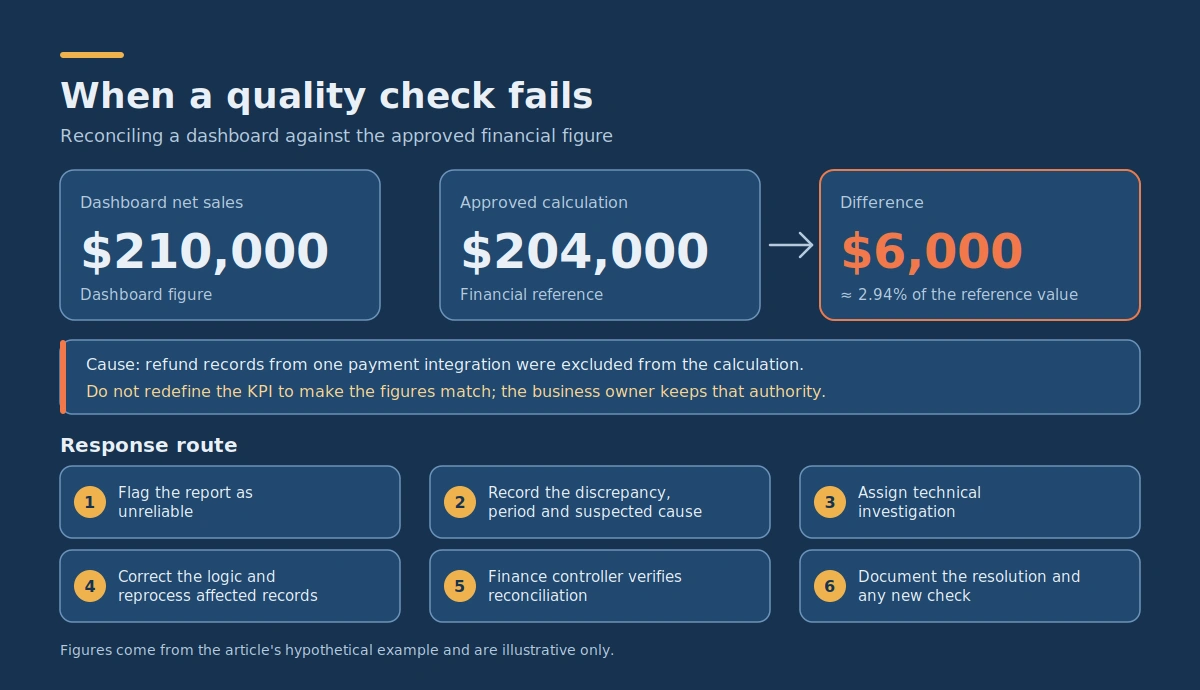
Suppose a dashboard reports monthly net sales of $210,000, while the approved financial calculation shows $204,000.
The difference is $6,000, approximately 2.94% of the reference value.
The technical team finds that refund records from one payment integration were excluded from the dashboard calculation.
The response should follow a defined route:
- Flag the affected report as unreliable for the relevant financial decision.
- Record the discrepancy, affected period, and suspected cause.
- Assign technical investigation to the integration owner.
- Correct the processing logic and reprocess affected records as appropriate.
- Ask the finance controller to verify reconciliation before restoring report approval.
- Document the resolution and determine whether a new automated check is needed.
Do not silently change the KPI definition to make the two figures match. The financial meaning of the metric must remain under the authority of its business owner.
The appropriate reconciliation tolerance depends on the business purpose and applicable requirements. For some reporting uses, even a small unresolved difference may be unacceptable.
Acceptance condition: Every critical quality check has a documented rule, accountable owner, failure response, and evidence of successful verification.
5. Document definitions and data flows without creating policy overload
Documentation should help someone understand or operate the data workflow. Its value comes from answering practical questions, not from the number of documents created. Microsoft’s governance guidance gives a useful warning here: a large volume of documentation can create a false sense that everything is under control, so auditing, monitoring, and active engagement with users matter as much as the documents themselves.
For the first governed workflow, a useful minimum consists of:
- Dataset inventory: What information exists, where it comes from, and who owns it.
- Metric glossary: How critical business measures are defined and calculated.
- Access rules: Who may use which information, for what purpose, and with whose approval.
- Quality checks: Which tests run, which failures matter, and who resolves them.
- Data flow description: How important information moves from sources to downstream reports.
- Retention and exception rules: How records are reviewed, how departures from policy are approved, and how incidents are handled.
A data flow can initially be described in plain language:
CRM customer records
         |
         v
Approved identity mapping
         |
         +--------------------+
         |                    |
         v                    v
Finance invoices       Support records
         |                    |
         +---------+----------+
                   |
                   v
          Validated data model
                   |
                   v
          Approved KPI glossary
                   |
                   v
        Commercial BI dashboard
                   |
                   v
      Authorized business users
This describes a logical flow, not a requirement to adopt a particular database or integration architecture.
For every important transfer, the team should know which identifiers connect the records, where transformation rules are implemented, and which downstream reports could be affected by a source change. The final stage of this flow is the reporting layer, and its success depends on more than governance alone. DataColab’s overview of business intelligence key implementation factors is a useful companion when planning the dashboards and data models that consume governed datasets.
Acceptance condition: A new authorized team member can find the meaning, source, owner, access conditions, and validation method for a critical reported metric without relying solely on informal knowledge.
6. Define retention rules based on purpose and obligations
Retention governance determines how long different information is needed and what should happen when it is no longer required.
It is a mistake to apply one arbitrary deletion period to every dataset. Different records may have different operational purposes, contractual obligations, or legal retention requirements.
A minimal retention register should identify:
| Record category | Purpose | Who sets the retention rule? | Review and disposal action |
| Invoices and financial transactions | Accounting, audit, and applicable record-keeping obligations | Finance and legal/compliance owners | Retain for the approved period, then follow the applicable archive or disposal procedure. |
| CRM customer records | Account management and approved commercial activities | Customer data owner with privacy input | Review purpose, ongoing need, and applicable deletion or anonymisation requirements. |
| Support conversations | Customer support, service records, and legitimate follow-up | Support owner with privacy/legal input | Apply the approved retention schedule and access restrictions. |
| System and access logs | Security, troubleshooting, and accountability | Security and technical owners | Retain according to the documented operational and applicable legal requirements. |
The table intentionally does not invent a universal number of months or years for each category.
For example, the UK GDPR storage limitation principle does not prescribe one fixed retention period for every type of personal data. Organizations need to justify retention according to the purpose and relevant obligations, regularly review what they hold, and erase or anonymise information when it is no longer needed, subject to applicable requirements and exceptions. The related data minimization principle limits personal data to what is necessary for the stated purpose.
These references concern UK data protection requirements. Businesses operating internationally must identify the rules applicable to their activities, locations, and individuals. Implementing this roadmap does not by itself establish legal compliance.
Acceptance condition: Each priority record category has a documented purpose, responsible owner, approved retention approach, and process for review or disposal. Unresolved legal requirements are referred to qualified specialists rather than guessed.
7. Create a short governance policy checklist
A governance policy should explain what people are expected to do and how exceptions are handled. It should be short enough that employees can understand and apply it during normal work. Microsoft’s guidance recommends exactly this: keep each data policy as short as possible, and include the policy owner, the scope and audience, how to request an exception, and how the policy will be audited and enforced.
The following checklist captures the minimum controls for the commercial reporting example.
Minimum data governance policy checklist
| Policy area | Required rule or evidence | Initial owner | Completed when |
| Data ownership | Priority datasets have accountable business owners and technical custodians. | Executive sponsor | Ownership matrix approved and communicated. |
| Access and sharing | Requests state purpose, permission level, approver, and review condition. | Data and security owners | Sample requests can be traced to actual system permissions. |
| Metric definitions | Shared KPIs have approved definitions and versioned changes. | Business metric owners | Critical reports reproduce agreed calculations. |
| Data quality | Required checks, error thresholds, and correction routes are defined. | Business steward and technical owner | Critical failures are detected and assigned. |
| Documentation | Source, owner, purpose, and important transformations are recorded. | Technical owner | An authorized user can trace a reported KPI to its source. |
| Retention | Record purposes, review requirements, and approved disposal procedures are identified. | Relevant data owner with privacy/legal input | Retention decisions are documented and applicable requirements reviewed. |
| Exceptions and incidents | Employees know how to report, approve, escalate, and resolve issues. | Governance coordinator | A test exception is handled through the documented process. |
To use the checklist, replace example roles with actual owners and record a status for each control: Not started, In progress, Blocked, or Approved.
Do not mark a policy as approved merely because a document exists. Test whether a person can follow the rule successfully.
The same guidance describes governance as most successful when it uses the most lightweight model that achieves the required objectives, is introduced iteratively, and fits into users’ regular workflow so that doing the right thing involves little friction. It also recommends scheduling regular policy reviews so rules are reassessed when needs change.
8. Handle exceptions and governance incidents through clear ownership
Governance rules need an exception process because unusual situations are unavoidable. A legitimate employee may need temporary access to a restricted dataset, or a data quality problem may prevent an important report from being published on schedule. Microsoft’s guidance lists a plan for requesting valid exceptions and departures from documented policies as an expected output of governance planning.
Two situations must be distinguished:
- Policy exception: A requested, documented departure from a standard internal rule, subject to appropriate authority and applicable obligations.
- Incident: A suspected or confirmed failure such as unauthorized access, data leakage, corrupted reporting, or an uncontrolled permission change.
A policy exception can sometimes be approved with additional safeguards. A security or privacy incident requires the organization’s established incident-response and escalation procedures. An internal approval cannot override applicable law or contractual obligations.
Worked exception record
Suppose a regional sales manager asks for temporary access to detailed customer transaction records to investigate a reporting discrepancy.
| Field | Illustrative entry |
| Exception ID | EX-014 |
| Requested departure | Temporary access to approved detailed transaction records outside the manager’s normal reporting scope. |
| Business justification | Investigate a documented regional revenue reconciliation discrepancy. |
| Risk and scope review | Finance and customer data owners assess whether an aggregate or limited extract would be sufficient. |
| Decision | Approve a restricted read-only extract rather than unrestricted source access. |
| Approver | Designated customer data owner, with required security review. |
| Time limit | Seven days, illustrative, followed by access removal. |
| Closure evidence | Investigation completed, extract handled under the approved rules, and temporary access revoked and verified. |
This example illustrates a possible decision, not a rule that temporary access should always be granted. If the purpose is unjustified or the requested access would violate an applicable requirement, the request must be rejected or redesigned.
How should governance issues be escalated?
Use a simple escalation sequence:
- Record the issue, affected dataset, business impact, and person reporting it.
- Assign the relevant owner and classify whether it is an ordinary quality issue, policy exception, or potential incident.
- Apply any necessary immediate restriction or workaround.
- Escalate to security, privacy, legal, or leadership where the issue requires their authority.
- Record the decision, remediation, verification, and closure.
This mirrors the checks-and-balances idea in Microsoft’s guidance, where business users operate day to day, supporting and compliance teams provide guidance and enforcement, and an executive sponsor or steering committee resolves issues that lower levels could not.
Do not wait for a routine monthly governance meeting to address a potentially serious security or privacy incident. Applicable reporting and response obligations may require prompt action.
Acceptance condition: Employees know where to report issues, responsible owners can make or escalate decisions, and significant actions are traceable to documented evidence.
9. Monitor governance through a few meaningful indicators
Monitoring demonstrates whether governance controls continue working after the initial rollout. It should reveal material problems and support corrective decisions, not create a large reporting burden. Microsoft’s guidance similarly recommends measurable success metrics and a regular review of the governance strategy, including a way for business users to give feedback.
For the hypothetical commercial reporting workflow, track four indicators initially.
| Metric | Definition | Illustrative pilot target | Owner |
| Critical dataset ownership | Priority datasets with approved owners divided by all priority datasets. | 100% | Governance coordinator |
| Access review completion | Access reviews completed by the scheduled date divided by reviews due. | At least 95%, with critical overdue reviews escalated | IT/security owner |
| Reporting quality pass rate | Scheduled critical report runs passing the agreed quality checks divided by all scheduled runs. | At least 98%, subject to zero unresolved critical publication blockers | Finance and technical owners |
| Issue resolution performance | Governance issues resolved within their assigned priority-based target time. | At least 90% of ordinary issues within the agreed target; critical incidents handled through their dedicated process | Relevant issue owners |
The targets are illustrative project acceptance criteria, not externally validated industry benchmarks.
For example, if 19 of 20 scheduled access reviews are completed on time, the completion rate is 95%. That may meet the numerical target, but a missing review involving highly privileged access could still require immediate escalation.
Metrics should therefore support judgement rather than override critical control requirements.
Review recurring issues to determine whether a policy is unclear, a system permission is difficult to administer, or employees need additional guidance.
Do you need a Center of Excellence?
Microsoft’s Center of Excellence guidance describes a COE as an internal team of technical and business experts who actively help others in the organization work with data. It also states that formal recognition on the organization chart is recommended but not required. What matters most is that the COE’s roles and responsibilities are identified, prioritized, and assigned, and many organizations perform them within an existing data, analytics, or BI team.
That is encouraging for a 70-person company. Its COE-style responsibilities, such as mentoring users, sharing good practices, and supporting governance guidelines, can be assigned to a small group without creating a new department. The guidance adds that a COE’s cross-departmental view of how data tools are used reveals which practices work and which do not, supporting a bottom-up approach to governance. It also recommends defining KPIs or OKRs to confirm the COE provides value. Be aware that a highly centralized team can drift toward one-size-fits-all decisions, which Microsoft cautions against; for most organizations it suggests a unified or federated structure, with a centralized team as an easy place to start.
10. A practical 30/60/90-day data governance implementation roadmap
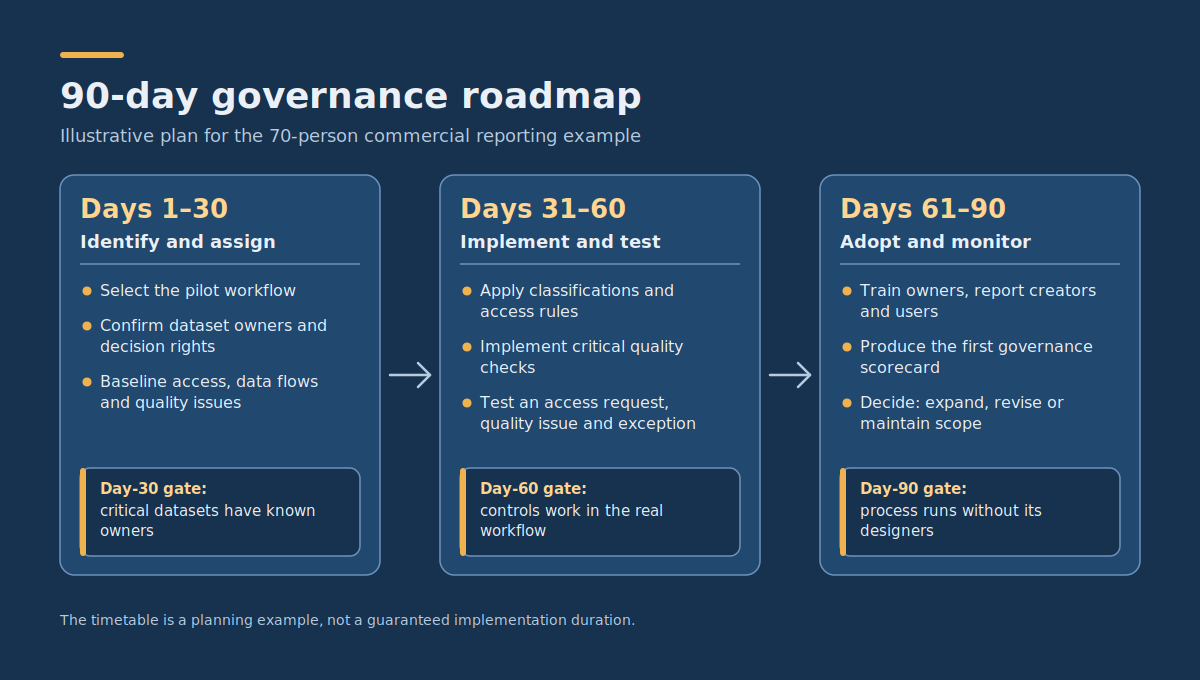
The following roadmap illustrates how the hypothetical 70-person business could introduce governance for its commercial reporting workflow. It follows the iterative pattern that Microsoft describes as the best fit for most organizations: do just enough governance planning up front, then improve it in stages alongside real delivery.
It assumes existing source systems, an executive sponsor, part-time availability from business owners, and technical staff capable of configuring current tools. The timetable is a planning example, not a guaranteed implementation duration.
Days 1–30: identify priority data and assign accountability
| Period | Work | Owner | Deliverable and acceptance gate |
| Days 1–10 | Select the commercial reporting workflow; identify critical datasets and existing problems. | Executive sponsor and finance controller | Approved pilot scope and initial dataset inventory. |
| Days 11–20 | Confirm dataset owners, metric decision rights, and technical custodians. | Business data owners | Ownership matrix approved for all pilot datasets. |
| Days 21–30 | Review current access, document important data flows, and identify critical quality issues. | IT/security owner and data steward | Access baseline, initial quality checks, and prioritized issue list. |
Day-30 gate: Proceed when critical datasets have known owners, important reporting definitions have accountable decision-makers, and no unresolved access issue prevents the planned pilot.
Days 31–60: implement minimum rules and test the controls
| Period | Work | Owner | Deliverable and acceptance gate |
| Days 31–40 | Apply agreed data classifications and access approval rules. | Business data owners and IT administrator | Permission checks pass for representative authorized and unauthorized users. |
| Days 41–50 | Implement critical quality checks and document metric calculations. | Finance controller, steward, and data engineer | Reference reports reconcile under approved definitions; failures generate actionable exceptions. |
| Days 51–60 | Introduce short policy documentation, retention review ownership, and issue/exception handling. | Governance coordinator and relevant specialists | Test access request, quality issue, and permitted policy exception are handled through the documented process. |
Day-60 gate: The business can demonstrate that controls work in the actual workflow. Important failures must be visible and assigned, and permission decisions must be enforceable through the underlying systems.
Days 61–90: establish adoption and ongoing monitoring
| Period | Work | Owner | Deliverable and acceptance gate |
| Days 61–70 | Train data owners, report creators, and affected users on access, quality, and issue reporting. | Governance coordinator and team managers | Users can locate the required policies and complete common requests. |
| Days 71–80 | Measure access reviews, reporting quality, ownership completeness, and issue resolution. | IT/security owner and data steward | First governance scorecard produced with documented exceptions and corrective actions. |
| Days 81–90 | Review effectiveness, assign recurring ownership, and select the next dataset or workflow if justified. | Executive sponsor and business data owners | Written decision to expand, revise, or maintain the current governance scope. |
Day-90 gate: The initial governance process is operating without constant intervention from its designers. Owners can handle routine access and quality decisions, significant exceptions are traceable, and monitoring can identify material failures.
If those conditions are not met, improve the existing workflow rather than expanding the programme merely because the 90-day period has ended.
What should you govern after the first 90 days?
Expansion should follow risk and business value. The next dataset may be one that supports another important financial report, contains sensitive information, or repeatedly causes operational problems.
Choose the next scope using three questions:
- What business decision or operational risk makes the dataset important?
- Which existing governance controls can be reused without unnecessary changes?
- What additional ownership, access, quality, or retention requirements must be addressed?
For example, the business may extend governance from commercial reporting to customer support analytics. It could reuse the access-request process and issue register while adding controls specific to customer conversations and permitted support-data use.
The broader data strategy roadmap template can help organize these additional initiatives alongside dependencies, owners, budgets, and delivery milestones. Governance should support that larger data strategy rather than becoming a separate programme with no connection to business outcomes.
How do you keep governance from becoming bureaucracy?
Data governance becomes burdensome when every ordinary activity requires manual approval, policies are difficult to locate, or responsibility is split among people who cannot make decisions.
To keep the process practical:
- Start with essential rules: Priorities ownership, access, quality, incident handling, and applicable retention obligations for critical information.
- Use existing systems: Record approvals and issues in the tools employees already use when they provide adequate controls and traceability.
- Make routine access predictable: Use agreed roles and permission patterns instead of repeatedly debating identical requests.
- Apply proportional review: Low-risk, reversible reporting activities need not follow the same approval process as access to highly sensitive information.
- Measure friction: Track whether employees can obtain legitimate access and resolve routine issues within a reasonable time.
- Remove ineffective controls: Review policies that create work but do not demonstrably reduce meaningful risk or improve data reliability.
For example, requiring approval from three executives for every internal dashboard view is unlikely to be proportionate when access can be managed through approved roles. By contrast, granting unrestricted access to sensitive customer data without documented purpose or authorization may create unacceptable exposure.
The aim is a system in which employees can understand and follow the appropriate rules during ordinary work.
Frequently asked questions about data governance strategy
What data governance policies should a business implement first?
Start with data ownership, access and sharing, critical data quality, and an exception or incident-handling process. Add documented retention and disposal requirements appropriate to the information being processed.
Prioritise the controls that address real decisions and risks. Some organizations already have security or privacy policies that can be reused rather than rewritten.
Who is accountable when data quality is poor?
The relevant business data owner is accountable for defining acceptable quality and deciding how the dataset may be used. Data stewards and operational teams coordinate corrections, while technical owners implement checks and fix system-level defects.
When the issue crosses business functions, escalate to someone with authority to resolve the competing definitions or priorities.
Do small businesses need a formal data governance team?
Not necessarily. A small organisation can use existing business owners, an IT administrator, and a designated coordinator to perform the essential functions.
A dedicated governance team or Center of Excellence becomes more useful as the number of datasets, departments, users, and cross-team decisions increases. Clear responsibilities matter more than creating a new organisational title.
How should governance exceptions be handled?
Record the requested departure, business reason, relevant risks, approving authority, conditions, and review or expiry point. Where an alternative provides the same legitimate benefit with less access or risk, prefer that alternative.
Policy exceptions must remain subject to applicable security, legal, privacy, and contractual requirements. Serious incidents should follow the organisation’s established incident-response process.
Does a data governance roadmap guarantee regulatory compliance?
No. Governance processes can help organisations manage information responsibly and demonstrate how certain controls operate, but they do not independently establish compliance with every applicable law or sector requirement.
Compliance obligations depend on the organisation’s jurisdictions, activities, information, and contractual commitments. Relevant requirements should be identified and reviewed by qualified personnel before policies and retention decisions are finalised.
Build governance around the decisions your business actually makes
Begin with one important workflow and a small set of datasets. Identify their owners, confirm who may access them, document the calculations and quality checks that matter, and establish a clear way to resolve exceptions.
Use the ownership matrix, policy checklist, access-review log, and 90-day roadmap as practical starting points. Replace the example roles and assumptions with the organisation’s actual responsibilities, systems, risks, and applicable obligations.
If your business needs help assessing existing data workflows, implementing access and validation controls, or designing a governed reporting and integration process, DataColab can discuss a focused data platform and workflow implementation assessment.
The value of a data governance strategy is not the quantity of documentation it produces. It is whether employees can use the information they need, important decisions have accountable owners, and errors or inappropriate access can be detected and resolved before they undermine trust.
Pingback:BI Team Structure: Roles, RACI & Hiring Order by Size
Pingback:Data Strategy Roadmap Examples: 3 Worked Plans
Pingback:Healthcare Data Solutions: Workflows, Governance & KPIs
Pingback:AI Training Data Labeling: Quality, Tools & Outsourcing
Pingback:Self-Service BI vs Governed Analytics: How to Balance Speed and Trust