
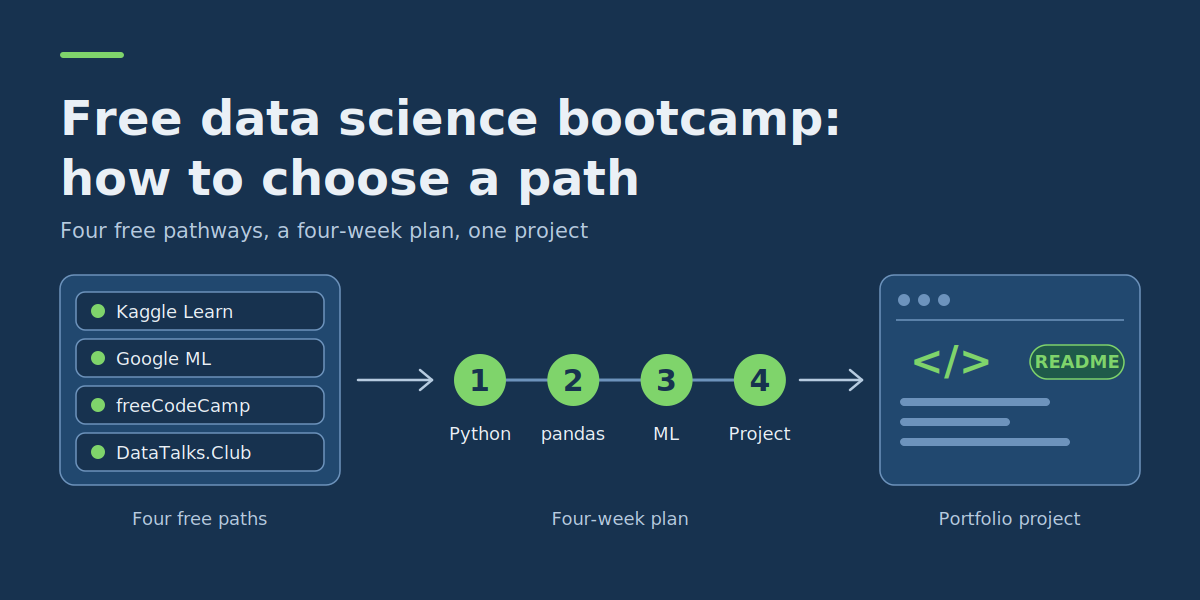
Free Online Data Science Bootcamps: What You Can Actually Learn and How to Choose
Last updated: October 2026
A free online data science bootcamp can teach you Python, data analysis, statistics and machine learning without paying tuition, but only if you choose a programme that matches your current skills. Some free courses are a few hours of exercises; others are months of structured, project-based study. This guide compares four genuinely free learning pathways, explains what “free” really includes, and gives you a four-week starter plan with a working portfolio project.
Key takeaways: choosing a free data science bootcamp
- You can learn data science without paying for a bootcamp. Kaggle Learn, Google’s Machine Learning Crash Course, freeCodeCamp and DataTalks.Club offer publicly accessible learning materials without a required course fee.
- Not every free course is a complete bootcamp. Some provide a few hours of focused exercises, while others include months of study, assignments and substantial projects.
- Your programming experience matters. Beginners can start with Python and data analysis; learners who already code can move into machine learning and model deployment.
- Certificates and course access are different things. Free materials do not always include free graded assessments or certificates, and some certificates depend on cohort deadlines.
- A finished project proves more than course completion. Your portfolio should explain the problem, data, methods, evaluation and limitations, not just copy tutorial notebooks.
For most complete beginners, a sensible path is to learn Python, practise cleaning and exploring datasets, understand basic statistical reasoning, and then build a small independent project. If you already write code, a structured machine learning bootcamp may be a better use of your time. A short interactive course is ideal for learning pandas, but it cannot replace a multi-month, project-based programme.
Who is a free online data science bootcamp suitable for?
Free online training suits self-taught learners who are willing to practise independently and do not need a classroom or paid career coaching. Different starting points need different paths:
| Your starting point | What to learn first | Suitable learning path |
|---|---|---|
| No programming experience | Python basics, working with tables, simple descriptive statistics | Kaggle’s introductory Python and pandas courses |
| Basic Python knowledge | Data cleaning, exploratory analysis, visualisation | Kaggle Pandas and freeCodeCamp’s data-analysis materials |
| Comfortable programmer, new to ML | Regression, classification, evaluation, feature preparation | Google Machine Learning Crash Course |
| Experienced programmer seeking a substantial project | End-to-end ML development, evaluation and deployment | DataTalks.Club Machine Learning Zoomcamp |
If you are new to both programming and statistics, expect to spend extra time on those foundations. A course labelled beginner-friendly may still expect you to understand variables, functions, charts or basic algebra.
A degree or expensive equipment is not automatically necessary for introductory data science. Many exercises run in browser-based notebooks or on an ordinary laptop, although advanced workloads may need more computing resources, so check the requirements first.
What does “free” mean in a free data science bootcamp?
The word “free” covers several different arrangements. Knowing the difference stops you committing to a course whose most useful parts are locked behind a payment.
| Access type | What you receive | What to check |
|---|---|---|
| Fully free learning programme | Course materials and practical exercises without mandatory tuition | Whether assessments, projects and certificates are also free |
| Free course audit | Some or all educational materials | Whether exercises, grading or certificates require payment |
| Free trial | Temporary access to a paid platform | Expiry date, payment requirements, restricted features |
| Freemium platform | A limited selection of free lessons | Whether the whole learning path can be completed for free |
| Scholarship or funded bootcamp | Fees covered for eligible participants | Residency, employment, application and funding conditions |
In this comparison, a genuinely free pathway means the teaching materials and core practical work are available without a course fee. Optional paid services, certifications and third-party computing are treated separately.
Also distinguish legitimate free resources from unauthorised copies of paid courses. A paid course advertised as a free download on an unrelated website is not an authorised free programme. Use official course pages, open educational materials or authorised auditing options.
Four free data science learning pathways compared
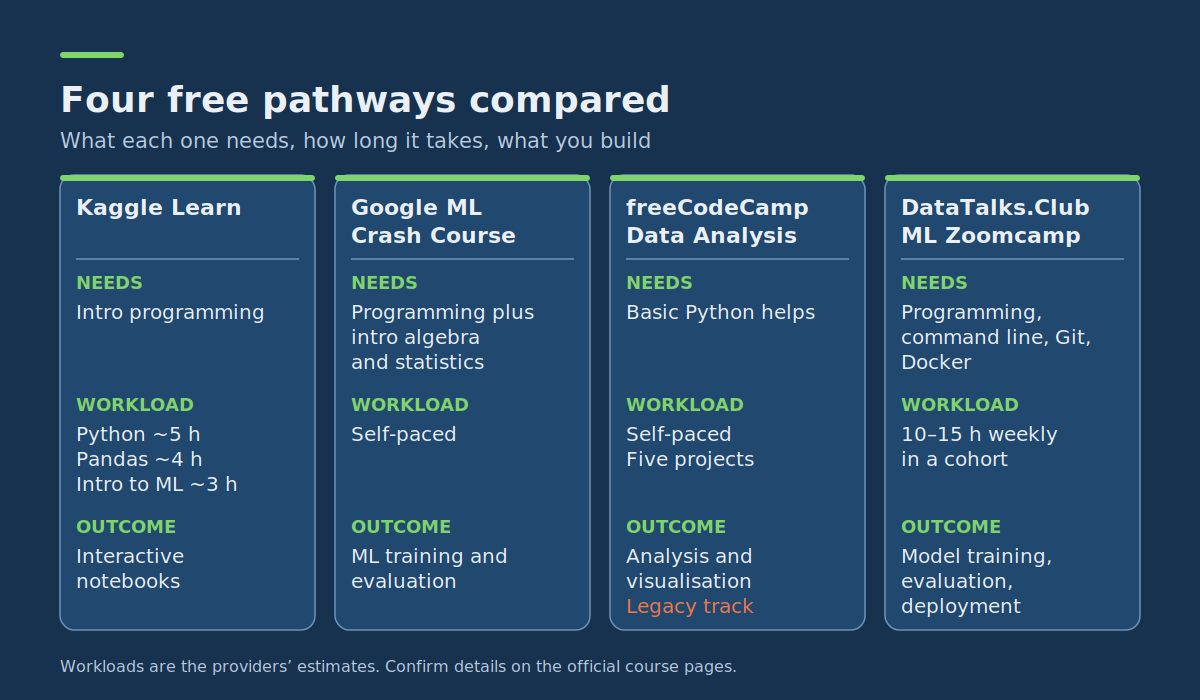
The options below reflect each provider’s published course information at the time of writing; confirm current details on the official course pages before you start. They cover different experience levels and are not interchangeable.
| Programme | Free access | Prerequisites | Workload | Practical outcome |
|---|---|---|---|---|
| Kaggle Learn | Free short courses and exercises | Introductory programming; later courses build on Python | Python about 5 hours, Pandas about 4, Intro to ML about 3 (Kaggle’s estimates) | Interactive notebooks and introductory modelling exercises |
| Google Machine Learning Crash Course | Free self-paced modules and interactive exercises | Programming plus introductory algebra and statistics | Self-paced; depends on prior knowledge | Practice with ML concepts, training and evaluation |
| freeCodeCamp Data Analysis with Python | Free content and project exercises; legacy track | Basic Python helps | Self-paced; five listed projects | Analysis and visualisation projects with Python libraries |
| DataTalks.Club ML Zoomcamp | Free live-cohort and self-paced materials | Programming, command-line confidence, basic dev tooling | About 10–15 hours weekly during a cohort | Model training, evaluation, deployment, independent projects |
Kaggle offers short, skill-focused lessons. Google’s course concentrates on machine learning fundamentals. freeCodeCamp supplies an accessible but no longer updated data-analysis curriculum. DataTalks.Club is a longer, more demanding machine learning engineering experience.
1. Kaggle Learn: best for getting started with practical exercises
Kaggle Learn provides free, interactive lessons covering Python, pandas, data visualisation, SQL and machine learning. Kaggle describes them as no-cost courses that teach practical data skills you can apply immediately. Its short-course format suits beginners who want to write real code before committing to a longer programme. A sensible sequence is:
- Python: variables, functions, lists, loops and libraries.
- Pandas: reading, selecting, grouping and cleaning tabular data.
- Intro to Machine Learning: basic modelling, validation, decision trees and random forests.
Those hour counts are course estimates, not a guarantee that every beginner reaches proficiency in twelve hours. You will need more time to repeat exercises, solve unfamiliar problems and build an original project. Kaggle also offers completion certificates for its Learn courses.
What you can realistically build: a notebook that loads a dataset, explores its columns, handles missing values and trains a basic prediction model.
Main limitation: several short lessons do not match the depth of designing, testing and explaining an independent project.
2. Google Machine Learning Crash Course: best for modelling fundamentals
Google’s Machine Learning Crash Course is a free, self-paced introduction that combines animated videos, interactive visualisations and hands-on programming exercises. Google says each module is self-contained, so learners with prior experience can skip to the topics they need. Its classification material covers confusion matrices and metrics such as accuracy, precision, recall and AUC, which are the same ideas you will meet in the wine project below. It is valuable if you already know some Python and want to understand how predictive models work rather than only calling a library function.
Google’s prerequisites guidance expects comfort with programming and concepts such as algebra, graphs and basic statistics. It also recommends introductory NumPy and pandas work, and browser-based exercises can run in Google Colab.
What you can realistically build: exercises in model training, feature preparation and evaluation, which you can then apply to a separate dataset as your own portfolio project.
Main limitation: it teaches important ML concepts but does not replace learning data cleaning, SQL, business analysis or the full data science lifecycle.
3. freeCodeCamp Data Analysis with Python: best for structured analysis practice (with a caveat)
freeCodeCamp’s Data Analysis with Python curriculum covers NumPy, pandas, working with datasets and visualisation. Its project section lists five assignments: Mean-Variance-Standard Deviation Calculator, Demographic Data Analyzer, Medical Data Visualizer, Page View Time Series Visualizer and Sea Level Predictor.
The important caveat: freeCodeCamp states on the course page that this content is no longer updated. It remains available as a legacy resource, but some instructions, tools or dependencies may need extra troubleshooting. Treat it as a supplementary project pathway, and learn Python fundamentals first if you are still new to coding.
What you can realistically build: data-analysis programs and visualisations that demonstrate operations on tabular data.
Main limitation: the curriculum is not actively maintained.
4. DataTalks.Club Machine Learning Zoomcamp: best for experienced programmers seeking a substantial bootcamp
The Machine Learning Zoomcamp is a free, project-oriented programme covering regression, classification, model evaluation, tree-based models, deployment and deeper ML topics. It assumes general programming literacy and comfort with the command line, Git and Docker. Previous ML experience is not required, but starting with zero programming knowledge would make it difficult.
The organisers recommend roughly 10–15 hours per week, with extra time for larger projects. Materials are available for self-paced study, but certificates depend on taking part in the live project window and meeting its submission and peer-review requirements. Some cloud exercises may also introduce optional third-party costs, so check free tiers and avoid unnecessary charges.
What you can realistically build: a prediction model with evaluation, an API that serves predictions and a documented end-to-end ML project.
Main limitation: it needs sustained effort and leans towards ML engineering rather than introductory data analysis.
How to choose the right free data science bootcamp
Compare programmes against your goal and constraints, not their titles. Ask yourself:
- Can I start with my current knowledge? Check whether the course assumes Python, statistics, SQL or development experience.
- Can I complete the practical work without paying? Confirm exercises, datasets and materials are available without tuition or a trial.
- Does the workload fit my schedule? Include time for coding, debugging and projects, not just watching lessons.
- Will I finish with something demonstrable? Prefer a path that ends in an analysis, model or documented application others can review.
- Are the materials still maintained? Check for outdated software or unavailable services.
| If your main goal is… | Start with… | Then do… |
|---|---|---|
| Learn to code for data science | Kaggle Python | Kaggle Pandas and a small analysis notebook |
| Understand machine learning concepts | Google Machine Learning Crash Course | Train and evaluate an independent model |
| Practise practical data analysis | Kaggle Pandas | Selected freeCodeCamp analysis projects |
| Build an end-to-end ML application | DataTalks.Club ML Zoomcamp | An independent project and deployment exercise |
If two options seem suitable, do the first practical exercise from each before committing. The better programme offers an appropriate challenge and a realistic path to completion, not necessarily the longest syllabus.
A four-week free data science learning plan
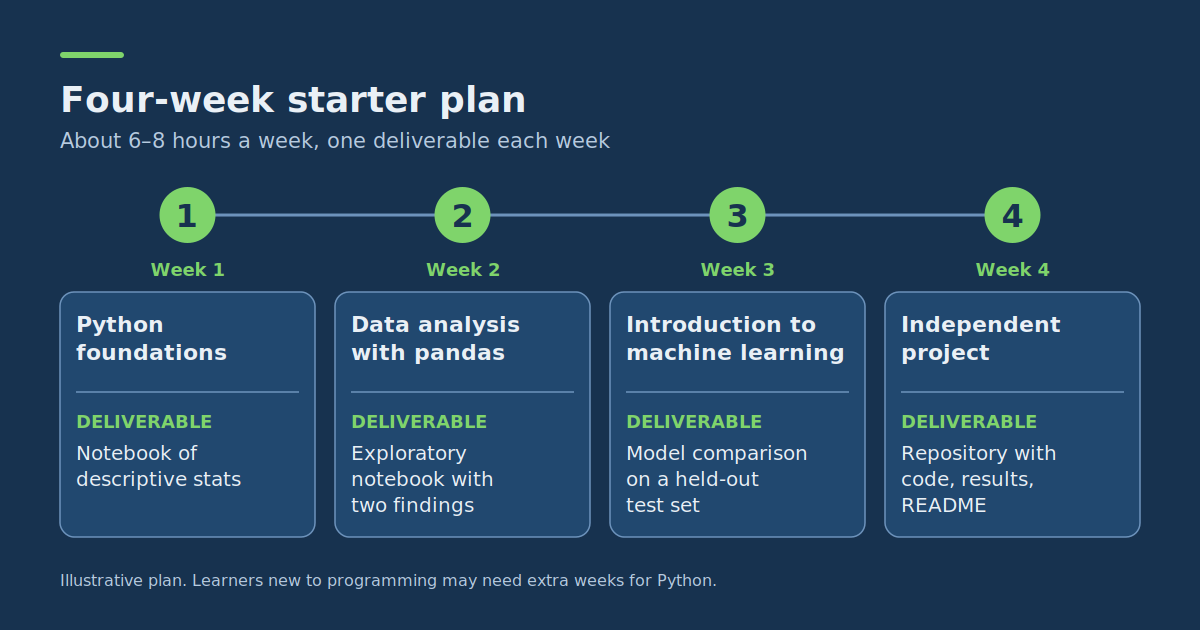
This illustrative plan assumes basic computer skills, no substantial data science experience and about six to eight hours a week. It is a starter pathway, not a promise to finish a professional bootcamp in four weeks; learners new to programming may need several extra weeks for Python alone. To see how these stages fit into a complete project, read our data science workflow guide.
| Week | Learning focus | Tasks | Deliverable |
|---|---|---|---|
| 1 | Python foundations | Introductory exercises; variables, functions, loops, lists; a small script that processes numbers | A notebook that calculates descriptive statistics from a list of observations |
| 2 | Data analysis with pandas | Load a dataset, inspect column types, count missing values, calculate grouped summaries, make a basic chart | An exploratory analysis notebook with a dataset overview and at least two findings |
| 3 | Introduction to machine learning | Train/test splits, regression or classification, baseline models, evaluation metrics | A basic model comparison on a held-out test set |
| 4 | Independent project | Choose a clear question, reproduce your workflow, interpret results, document limitations | A shareable repository with code, results and a README |
How to split a seven-hour study week:
- 2 hours studying explanations and examples
- 3 hours completing coding exercises
- 1 hour experimenting without following the tutorial
- 1 hour documenting what you learned and reviewing mistakes
This deliberately puts more time into writing and modifying code than watching videos. With only three hours a week, stretch the plan to eight or nine weeks. If you already know Python, spend less time on week one and more on evaluating your project. For a full Machine Learning Zoomcamp, follow its own longer schedule.
Portfolio project: build and evaluate your first classification model
A useful beginner project makes your decisions visible: the problem, the data, how you split it for evaluation and whether your model beats a simple baseline.
- Project: predict the category of a wine sample from measured chemical characteristics.
- Dataset: the Wine recognition dataset included with scikit-learn: 178 samples, 13 numerical features and three classes. No separate download is needed.
- Goal: compare a majority-class baseline with a logistic regression model on held-out data.
- Assumption: this is an educational benchmark, not a production decision-making system.
If you want a quicker route to a first working model, see how to create a machine learning model fast, then come back and add the baseline and evaluation that make it portfolio-ready.
Step 1: Prepare the Python environment
Use a notebook or local Python environment. If needed, install the packages:
pip install pandas scikit-learnStep 2: Run the complete starter example
import pandas as pd

from sklearn.datasets import load_wine
from sklearn.dummy import DummyClassifier
from sklearn.linear_model import LogisticRegression
from sklearn.metrics import accuracy_score, classification_report
from sklearn.model_selection import train_test_split
from sklearn.pipeline import make_pipeline
from sklearn.preprocessing import StandardScaler

# Load the dataset
dataset = load_wine(as_frame=True)

X = dataset.data
y = dataset.target

# Inspect the dataset
print("Rows:", len(X))
print("Features:", len(X.columns))
print("Missing values:", X.isna().sum().sum())
print("Class distribution:")
print(y.value_counts().sort_index())

# Keep a separate test set
X_train, X_test, y_train, y_test = train_test_split(
    X,
    y,
    test_size=0.25,
    random_state=42,
    stratify=y
)

# Establish a simple baseline
baseline = DummyClassifier(strategy="most_frequent")
baseline.fit(X_train, y_train)

baseline_predictions = baseline.predict(X_test)

# Train a classification model
# Scaling is fitted only on training data
model = make_pipeline(
    StandardScaler(),
    LogisticRegression(max_iter=2000)
)

model.fit(X_train, y_train)

predictions = model.predict(X_test)

# Compare results
print("Baseline accuracy:", accuracy_score(y_test, baseline_predictions))
print("Model accuracy:", accuracy_score(y_test, predictions))

print(classification_report(y_test, predictions, zero_division=0))
Step 3: Understand the results
The code loads the dataset, shows its dimensions and class distribution, and separates training data from test data. The majority-class baseline predicts the most common training class, giving you a simple reference point. The logistic regression pipeline standardises features using only the training data, which stops information from the test set leaking into preprocessing.
The script reports baseline accuracy, model accuracy, and precision, recall and F1-score for each class. You should see 178 samples and 13 features if the dataset loads correctly. Metrics are calculated when you run the code, so never paste someone else’s results into your project as your own measurements.
The fixed random state makes the split reproducible under the same software and data conditions, but one small test set cannot tell you how a model would perform in an unfamiliar real-world application.
Step 4: Improve the project beyond the tutorial
- Inspect feature distributions and identify unusual values.
- Create at least two charts that explain relationships in the data.
- Explain the class distribution and why you used a stratified split.
- Compare the model with the majority-class baseline.
- Inspect which classes are confused and discuss the limits of the evaluation.
- Document what you would need before using a similar approach on new, independently collected data.
As a further exercise, use cross-validation on the training data to see how performance varies, and keep the final test set untouched while choosing or tuning your model.
Why evaluation skills matter: lessons from RAG and chatbot projects
The baseline-and-metrics habit from the wine project carries straight into modern AI work. Microsoft’s documentation on RAG evaluators describes a retrieval-augmented generation (RAG) system as one that searches a set of grounding documents for a user’s query and then generates an answer consistent with what it found. It separates evaluation into two layers: process evaluation, which judges the retrieval step, and system evaluation, which judges the final response.
Two of its definitions map neatly onto the precision and recall you meet in classification reports:
- Groundedness is the precision side: the answer should not contain content outside the supplied context.
- Response completeness is the recall side: the answer should not miss critical information compared with the expected response.
The same documentation explains that its model-judged evaluators score from 1 to 5, with a default pass threshold of 3, and that retrieval quality matters because poor retrieval leaves the language model with little chance of a satisfactory answer. For a learner, the takeaway is simple: whatever you build, define what “good” means, measure it against a baseline and report where it fails.
That makes a document-based question-answering bot a strong second or third portfolio project once you are comfortable with classification. When you are ready for more ambitious ideas, browse these impressive deep learning projects for inspiration beyond tabular data.
What should a beginner data science portfolio contain?
A portfolio does not need dozens of notebooks. A few carefully explained projects beat many unfinished tutorials. Use this structure for your first project:
| Portfolio component | What to include |
|---|---|
| Problem statement | The question you are investigating and why it matters |
| Data description | Source, features, target, size and known limitations |
| Exploratory analysis | Relevant charts, descriptive statistics, key observations |
| Method | Preprocessing and model choices, and why you made them |
| Evaluation | Baseline comparison, validation approach, relevant metrics |
| Limitations | Data weaknesses, uncertainty, where results may not generalise |
| Reproduction instructions | Dependencies and steps for someone else to run the project |
For the wine example, your repository could contain a notebook, a requirements file and a README that answers: What does the project investigate? Where does the data come from? What did you compare? What did you learn? What are the limitations? A model with impressive accuracy is not automatically the strongest project; clear reasoning, reproducibility and sound evaluation often say more about your understanding.
Which project should you build next?
Once you can analyse a prepared dataset on your own, choose a project that needs more data preparation or answers a real question in a subject you know:
- Retail sales analysis: examine monthly sales patterns, product categories and unusual changes in a permitted dataset, and deliver a documented visual report.
- Customer enquiry classification: use licensed or synthetic text to classify support topics, evaluate mistakes across categories and explain data limitations.
- Housing price estimation: use a public, appropriately licensed dataset to build a regression baseline and examine errors across property groups.
Each project needs a specific question and an evaluation method. Avoid claiming business impact or real-world reliability from a classroom dataset.
Where to publish your portfolio
A portfolio only helps if reviewers can open it. GitHub suits code, and a personal website or blog is a good home for case-study write-ups with charts and explanations.
Common mistakes when learning data science for free
Collecting courses instead of finishing projects. It is easy to accumulate tutorials without becoming able to solve unfamiliar problems. After finishing the basics in one area, apply the skill independently before starting another course.
Skipping Python and statistics fundamentals. Copying ML code without understanding arrays, functions, distributions or metrics makes debugging and interpretation hard. You do not need advanced mathematics for every beginner project, but basic statistical reasoning and comfort with code are essential.
Assuming a certificate shows job readiness. Certificates document completion; they do not show you can prepare a dataset, explain a model or handle ambiguous requirements. A portfolio project with clear methodology gives reviewers something substantive to examine, though it does not guarantee employment.
Reusing the test set to improve a model. If you keep adjusting the model to raise test scores, the test set quietly becomes part of development. Use training data and validation methods for model selection, and save independent test data for a final check.
Choosing advanced tools too early. Jumping to deep neural networks, cloud deployment or large language models before you can clean and inspect a simple dataset is a common trap. Start with the simplest method that answers the question.
How long does it take to learn data science with free courses?
There is no reliable universal timeline. Speed depends on programming experience, mathematical background, weekly study hours and the depth of practical work. Someone with Python experience may move quickly into independent projects, while a first-time programmer needs extra time for functions, data structures and debugging. As a planning example, not a prediction:
- Four weeks at 6–8 hours weekly: a focused introduction to Python, pandas, modelling concepts and a small project may be achievable for a steady learner.
- Several additional months: more realistic for building independent skills in data cleaning, statistical reasoning, modelling and documentation.
- A structured multi-month bootcamp: appropriate when you want substantial assignments and an end-to-end project with modelling and deployment.
Measure progress by what you can do without copying instructions. If you can inspect a new dataset, form a question, build a baseline and explain the evaluation, you are making real progress however many course hours you have logged.
Frequently asked questions about free data science bootcamps
Are free data science bootcamps really free?
Some are. Kaggle Learn offers its short courses without a course fee, Google’s Machine Learning Crash Course is publicly accessible, and DataTalks.Club provides free materials and participation. Other platforms offer only limited lessons or temporary trials. Always verify exercise access, certification conditions and possible third-party computing costs before enrolling.
Can I learn data science for free without a university degree?
Yes. The introductory courses in this guide do not require a degree, though more advanced programmes assume substantial programming knowledge. Learning without a degree still takes consistent practice, solid foundations and the ability to explain your work.
How many hours per week should I study?
Six to eight hours per week is a manageable start for introductory self-study, depending on your circumstances. DataTalks.Club recommends roughly 10–15 hours weekly for its Machine Learning Zoomcamp. Choose a workload you can sustain and leave time for coding and debugging, not just videos.
Which free data science course is best for a complete beginner?
Kaggle’s introductory Python lessons are a practical starting point because they offer short exercises and a progression towards pandas and basic machine learning. If you already program, Google’s Machine Learning Crash Course or a more substantial ML programme may suit you better.
Can I get a free certificate from an online data science course?
Some providers offer them. Kaggle describes free completion certificates for its Learn courses. DataTalks.Club’s Zoomcamp certification requires meeting the rules and deadlines of a live project window, including peer reviews. Other course and audit arrangements may charge for certificates, so check current requirements.
Which portfolio project best demonstrates beginner data science skills?
Choose a project you can explain from start to finish. A documented classification or regression project with exploration, a baseline, appropriate evaluation and stated limitations is a strong start. The wine exercise in this guide can be extended that way, though an independently chosen dataset and question shows more originality.
Can free online training replace a paid data science bootcamp?
Free resources can supply much of the technical material. What they may not reproduce is scheduled mentoring, personalized feedback, organized peer accountability or career services. Whether those justify paying depends on your learning needs, budget and ability to work independently.
Your next step: choose one path and finish one project
Start with the course that matches your present skills, not the one promising the most advanced outcome. If you are new to programming, complete introductory Python and pandas exercises. If you already code, work through machine learning concepts and begin a reproducible project. Use the four-week plan as a starting schedule, document what you learn and aim to complete one analysis that another person can run and evaluate.