
Enterprise NLP Use Cases: From Document Intake to Measurable Business Value
What matters most when implementing enterprise NLP
- Start with a specific workflow, not a language model. Document classification, field extraction, information retrieval and summarisation solve different problems and require different evaluation methods.
- Automate low-risk decisions first. Route uncertain results and high-impact exceptions to qualified reviewers rather than treating every model output as a final decision.
- Measure the cost of errors alongside accuracy. A system that saves processing time can still be uneconomical if incorrect outputs create expensive downstream problems.
- Use the simplest suitable technology. Rules, conventional search and established document-processing tools may outperform complex generative AI systems on predictable tasks.
- Design for existing operations. Useful enterprise NLP solutions need clear data permissions, integration points, review ownership and measurable acceptance criteria.
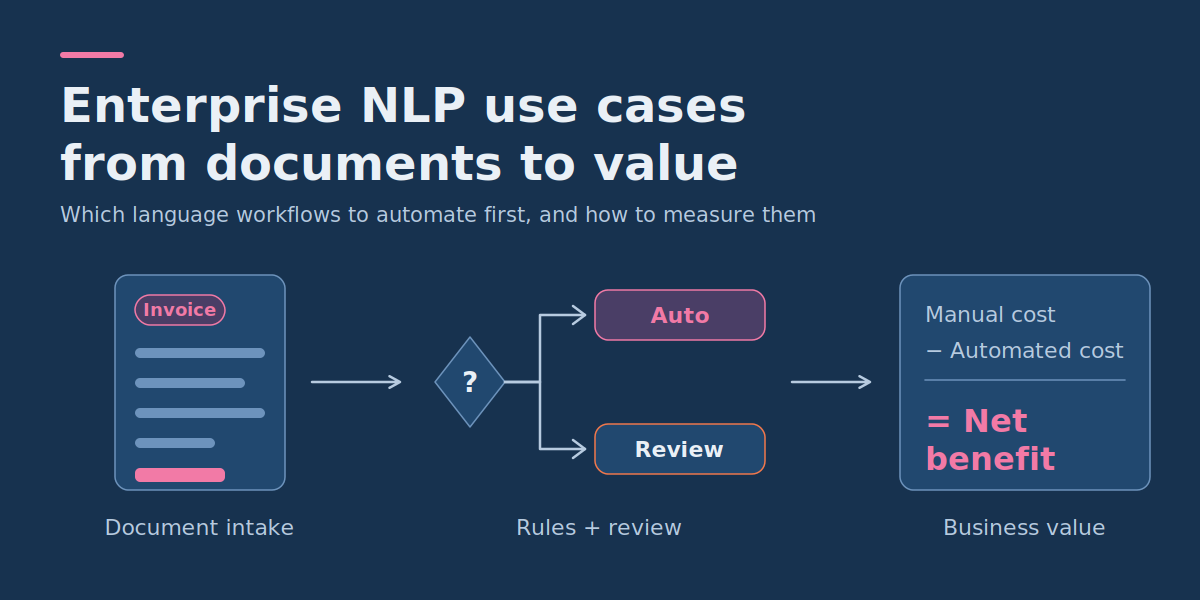
The strongest enterprise NLP use cases are not the most sophisticated ones. They are the workflows where language work is repetitive, outputs are well defined and mistakes can be caught before they cause harm. Enterprise natural language processing (NLP) can reduce the manual work involved in understanding, sorting and extracting information from business documents, but choosing the right application matters more than choosing the most advanced model. An invoice-processing system, a contract search tool and a customer-service classifier may all use NLP, yet they have different accuracy requirements, failure consequences and opportunities for automation.
For enterprise IT and product managers, the practical question is which language workflows are repetitive enough to automate, valuable enough to justify the investment and safe enough to operate with defined controls. The answer comes from examining the existing process, matching each task to an appropriate technology and measuring performance against the cost of human work and incorrect decisions.
What does enterprise NLP actually do?
Natural language processing enables software to analyse and work with human language. Enterprise NLP applies these capabilities to organisational documents, communications, knowledge bases and operational systems.
Unlike a general-purpose chatbot, an enterprise NLP application usually has a narrower responsibility. It might classify an incoming document, identify a contractual obligation, retrieve a relevant policy passage or extract structured information for a business application.
These responsibilities can be grouped into several task types:
| NLP task | What it produces | Enterprise example | Primary evaluation concern |
| Text classification | A predefined category or label | Routing customer requests to the correct department | Incorrect or missed categories |
| Named entity recognition (NER) | Identified entities and their positions in text | Finding company names, dates and reference numbers | Missing or incorrectly identified entities |
| Document extraction | Structured values from documents | Capturing invoice totals, currencies and supplier identifiers | Incorrect, missing or mismatched fields |
| Semantic retrieval | Relevant documents or passages | Finding policies using natural-language questions | Missing the relevant source |
| Summarisation | A shortened representation of source content | Creating a contract review summary | Omitted obligations or unsupported statements |
| Information redaction | Text with selected sensitive information removed or masked | Preparing support records for approved secondary use | Sensitive information left exposed |
The distinction matters because there is no single accuracy metric that adequately describes all these tasks. A document classifier can be tested against known categories, while an extraction system needs field-level validation. A generated summary also needs checking for factual support and missing material information.
Which enterprise NLP use cases deserve automation first?
The best starting point is usually a workflow with substantial repetitive language work, accessible historical examples, well-defined outputs and manageable consequences when the system makes a mistake.
1. Document intake and automatic routing
Many organisations receive documents through email, customer portals or shared folders. Employees inspect them to determine whether they are invoices, contracts, purchase orders, claims or correspondence.
A document classifier can assign a document type and pass it to the appropriate process. For example, a supplier invoice goes to accounts payable, while a contract amendment goes to legal operations.
This is attractive when categories are stable and staff spend meaningful time sorting documents. However, classification mistakes can create delays or send sensitive material to the wrong destination. Access permissions and exception routing must therefore be part of the design.
2. Invoice and purchase-order extraction
Document extraction converts information embedded in PDFs, scans or emails into structured records. An invoice-processing application may capture supplier identifiers, invoice numbers, dates, currencies, line items and totals.
These fields can be validated against purchase orders and supplier master records before approved entries reach an accounting or enterprise resource planning (ERP) system.
The main difficulty is not merely reading the text. It is correctly interpreting the information across different layouts, distinguishing similar fields and preventing a plausible but incorrect value from entering a financial workflow.
3. Contract review and obligation tracking
Legal and procurement teams frequently inspect agreements for renewal dates, termination notice periods, payment terms and contractual obligations.
NLP can highlight relevant passages and propose structured fields for review. A searchable index may also help authorised employees locate the original clauses.
However, contractual meaning can depend on definitions, exceptions and references elsewhere in the agreement. An extracted date should not automatically be treated as an approved legal interpretation. Critical obligations should remain subject to appropriate specialist review.
4. Customer support and service request classification
Support requests can be classified by product, issue type, urgency or responsible department. An organization might use the results to priorities tickets and recommend existing knowledge-base articles.
This is particularly suitable when categories have clear definitions and routing mistakes can be corrected before causing material harm. Teams that want classification to feed a customer-facing assistant can evaluate a conversational AI NLP platform for English alongside their existing ticketing tools.
Predicting customer sentiment, by contrast, may be less reliable when messages contain sarcasm, mixed emotions or limited context. Sentiment scores should not automatically determine consequential decisions about individual customers.
5. Internal knowledge retrieval
Employees often need answers from large collections of internal policies, manuals and operating procedures.
Natural-language retrieval can help them discover relevant material. A retrieval-augmented generation (RAG) system can go further by producing an answer based on retrieved passages. When that capability needs to sit behind a conversational interface, custom AI chatbot development can connect retrieval to approved sources and existing access controls.
RAG is useful when staff need a synthesized explanation rather than a list of documents. But when the primary requirement is finding a particular policy or exact clause, conventional search may be simpler, easier to audit and sufficient.
How to choose between rules, classification, extraction and RAG
The technology decision should follow the required output and the variability of the input, not the popularity of a model architecture.
| Business requirement | Good starting approach | When a more advanced method is justified |
| Identify an exact reference number in predictable text | Rules and pattern matching | Formats are highly variable or context determines the correct reference |
| Assign a document or message to a category | Rules or a text classifier | Categories depend on meaning rather than fixed keywords |
| Read fields from invoices or forms | OCR and document extraction | Unstructured layouts require deeper contextual interpretation |
| Find a known internal document | Keyword or metadata search | Relevant material uses varied terminology that exact search misses |
| Answer a question using several documents | Retrieval plus a grounded language model | Answers genuinely require synthesis across retrieved evidence |
| Interpret a high-impact contractual decision | Source retrieval and specialist review | Automation assists preparation without replacing required judgement |
Extraction versus named entity recognition
Named entity recognition identifies entities such as people, organizations, locations and dates within text. Document extraction is broader: it assigns values to business-specific fields and may need to understand document structure, relationships and tables.
For example, NER might identify three dates in an agreement. A contract extraction system must determine which date represents the effective date, renewal date or termination deadline. These are different requirements, even if both systems use language models.
When should you use an LLM?
A large language model (LLM) is most useful when the input varies significantly, the task depends on contextual meaning or the desired output involves controlled natural-language generation.
It is not automatically the best choice for extracting a fixed invoice identifier or routing messages according to simple, stable keywords.
LLM-based extraction may be appropriate for complex documents, but its outputs still require schema validation, grounding and evaluation. Asking a model to return structured JSON does not make the information correct.
How to evaluate a RAG system
For RAG, evaluation must cover two separate questions: did retrieval find the necessary evidence, and did generation use that evidence correctly? A fluent answer can fail even when the retrieval stage succeeds.
Microsoft’s RAG evaluators documentation reflects this split. It separates process evaluation, which assesses the retrieval step, from system evaluation, which assesses the quality of the final response. Several verified points are useful when planning a test:
- Groundedness is a precision measure. It checks that the response does not contain content outside the grounding context.
- Response completeness is a recall measure. It checks that the response does not miss critical information compared with the expected answer. Microsoft currently lists this evaluator as a preview feature.
- Retrieval quality limits answer quality. If retrieval is poor and the question needs corpus-specific knowledge, the language model is less likely to give a satisfactory answer.
- Precise retrieval metrics need labelled data. The document retrieval evaluator compares retrieved documents with human-labelled relevance judgements, and the documentation describes using it to compare search settings such as the search algorithm, number of results returned and chunk size.
Reference pipeline: Enterprise document classification and extraction
Consider an accounts-payable department receiving invoices through an approved email inbox and a supplier portal. Staff currently open documents, identify their type, enter key fields, check them against purchasing records and handle exceptions.
The objective is to automate document preparation and selected low-risk approvals while retaining control over financial decisions.
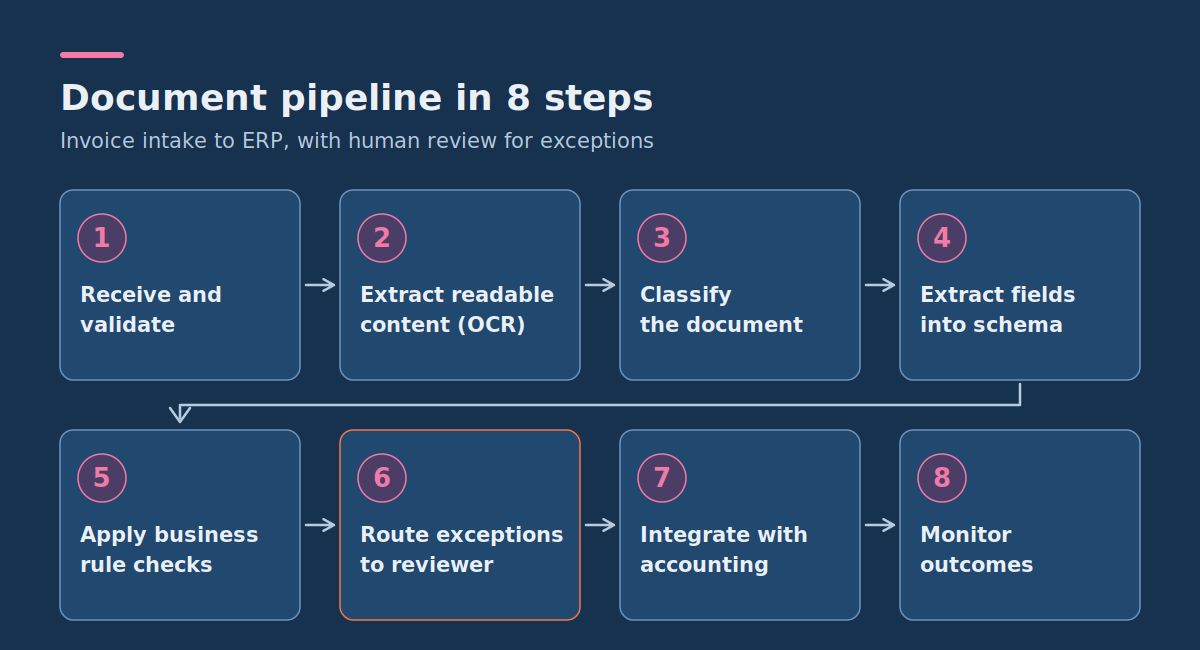
Step 1: Receive and validate the document
The intake service accepts supported files from approved sources and assigns a unique processing identifier. It checks file type, size, access permissions and whether the document has already been processed.
The original file is retained according to the organization’s records policy so authorized reviewers can inspect the evidence.
Step 2: Extract readable content
For scanned documents, optical character recognition (OCR) converts the visible text into machine-readable content. For digitally generated PDFs, direct text and layout extraction may be sufficient.
Where supported, the system preserves page references and the locations of extracted fields. These references help reviewers determine whether a value came from the correct part of the document.
Step 3: Classify the document
A classifier determines whether the file is an invoice, credit note, purchase order or unsupported document type.
Unsupported, ambiguous and mixed-document inputs enter an exception queue rather than being forced into one of the expected categories.
Step 4: Extract fields into an agreed schema
For invoices, the extractor produces a record containing fields such as:
- Supplier name and internal supplier identifier
- Invoice number
- Invoice date and payment due date
- Currency and total amount
- Purchase order reference
- Relevant line items where needed for matching
Each extracted field should have an explicit type and validation rule. For example, an invoice date must be a valid calendar date, and the currency should use an accepted code.
Step 5: Apply deterministic business checks
After extraction, conventional application logic checks for missing required fields, duplicate invoice identifiers, inconsistencies between totals and line items, and matches against approved supplier and purchase-order records.
These checks are independent of the language model. A high-confidence prediction must not override a failed business rule.
Step 6: Route exceptions to a human reviewer
Documents enter a review queue when required fields are uncertain, business rules fail, document types are unsupported or the proposed action exceeds the permitted automation boundary.
The reviewer sees the original document, the extracted values, supporting locations and the reason for escalation. They can approve, correct or reject the record.
Step 7: Integrate with the accounting system
Only records satisfying the defined policy are passed to the downstream application. The integration should preserve the source identifier, record validation results and prevent duplicate submissions on retries.
Any operation that could change payment destinations or authorize sensitive financial actions should have separate controls and approvals.
Step 8: Monitor outcomes
Track volumes, review rates, correction types, processing time, escaped errors and downstream rework. Reviewed corrections can inform future evaluation and model improvements after appropriate quality checks.
The operational flow is:
Approved document source → Intake validation → OCR/text extraction → Document classification → Field extraction → Business-rule checks → Automatic acceptance or human review → Approved ERP integration → Outcome monitoring.
Document-processing platforms can support portions of this approach, but review and integration policies remain application responsibilities. Whichever platform you choose, evaluate it on representative documents from your own workflow and set confidence-based review thresholds from pilot results rather than vendor defaults.
Worked example: Decide whether a document can be processed automatically
The following example is hypothetical. It illustrates how an enterprise team could define review decisions; the field values, confidence scores and thresholds are not measured model results.
Assume an invoice from Northline Components contains invoice number NC-1048, a total of EUR 12,480.00 and a payment due date of 18 November 2026.
The extraction service returns the following:
| Field | Extracted value | Illustrative confidence | Validation result |
| Supplier | Northline Components | 0.97 | Matched to approved supplier record |
| Invoice number | NC-1048 | 0.98 | Format valid; duplicate check passed |
| Total amount | 12,480.00 | 0.94 | Amount reconciliation passed |
| Currency | EUR | 0.71 | Requires human verification |
| Due date | 2026-11-18 | 0.95 | Valid date |
Suppose the team’s provisional rule requires confidence of at least 0.90 for each critical field, alongside successful validation against its business records.
The document must be reviewed because the currency field falls below that illustrative threshold. It should not be approved simply because the other four fields appear reliable.
Even if all fields exceed the threshold, a separate policy may require human approval for exceptional values, new supplier records or changes to payment details.
Important: Model confidence is not a universal guarantee of correctness. Some systems produce scores that are not directly comparable or well calibrated. The team must verify how confidence behaves on its own documents before using it for automation decisions. Thresholds should depend on the consequences of particular errors, not an arbitrary percentage.
How to evaluate enterprise NLP accuracy before deployment
An enterprise NLP pilot should be evaluated against a representative set of documents with independently checked expected outcomes.
The test set should include normal cases and meaningful variations: different suppliers, formats, languages, document quality, missing information and historically difficult examples.
Keep evaluation examples separate from those used to develop or tune the system. Otherwise, reported performance may not represent what happens with new documents.
Measure the right metric for each task
| Task | Useful measurements | What they reveal |
| Document classification | Precision, recall, F1 and confusion matrix by category | Which document types are confused or missed |
| Field extraction | Field-level precision, recall, F1 and exact-match rate | Whether required information is correct and complete |
| Automatic processing | Straight-through processing rate and escaped-error rate | How much work is automated and how often material errors escape |
| RAG retrieval | Retrieval recall and ranking relevance against labelled queries | Whether relevant evidence is found |
| RAG answers | Groundedness, correctness and answer completeness | Whether answers are supported and sufficiently complete |
| Operational workflow | Human review time, correction rate and end-to-end processing time | Whether the system improves the business process |
Precision measures the proportion of predicted items that are correct. Recall measures how many expected items were successfully found. F1 combines both measurements.
For extraction tasks, these metrics are generally more informative than a single overall accuracy percentage, particularly when some fields are optional or repeated. They also show how performance changes as confidence thresholds move, which is why thresholds should be set from pilot data.
For financially sensitive fields, also measure exact document-level correctness. An invoice with nine correct fields and one incorrect total can still be operationally unacceptable.
Define acceptance criteria before tuning the model
Acceptance criteria should describe business outcomes and failure consequences rather than relying exclusively on a model score.
An illustrative pilot policy might require:
- Every automated record must pass mandatory field and business-rule validation.
- Payment destination changes must never be authorized solely from extracted document content.
- Critical document types and edge cases must have explicit review rules.
- The escaped material-error rate must remain below a threshold approved by the process owner.
- Review volume must be low enough to provide a worthwhile operational benefit.
- The team must measure and investigate errors separately for document types, suppliers and layouts.
No universal accuracy threshold makes an NLP application safe. The appropriate standard depends on the workflow, the severity of errors and applicable obligations.
Practical worksheet: Calculate the real business value of NLP automation
Automation value should be calculated after including human review, processing charges, integration support and the estimated cost of errors that reach the business.
The worksheet below uses an illustrative monthly invoice-processing scenario. All financial figures are hypothetical assumptions, not DataColab pricing or observed customer results.
Step 1: Establish the manual-processing baseline
| Input | Assumed value | Calculation or meaning |
| Documents per month | 1,000 | Monthly workload |
| Manual processing time | 6 minutes per document | Current average effort |
| Loaded labor cost | $0.60 per minute | Illustrative staff cost |
| Current monthly processing cost | $3,600 | 1,000 × 6 × $0.60 |
This simplified baseline includes processing labor only. It assumes no separate charge for errors in the existing manual workflow. A real business case should incorporate baseline correction and exception costs when those figures are available.
Step 2: Estimate the automated workflow
Assume the pilot processes 1,000 documents, accepts 700 without human review and routes 300 for manual checking.
| Cost component | Hypothetical calculation | Monthly cost |
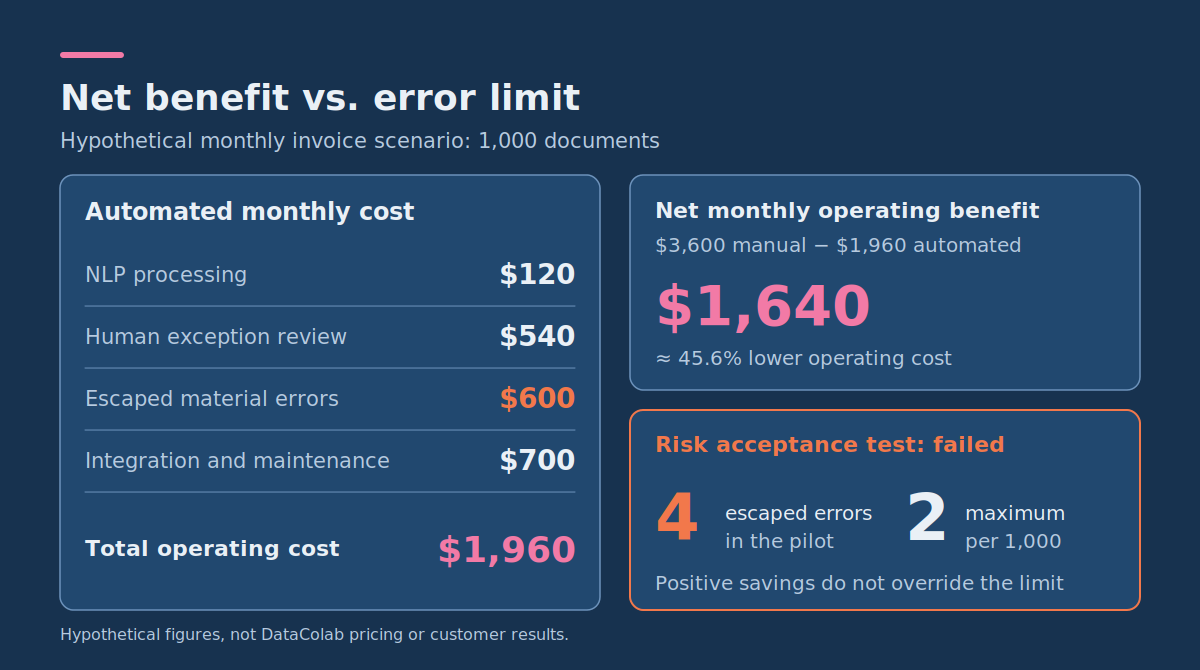
| NLP processing | 1,000 × $0.12 per document | $120 |
| Human exception review | 300 × 3 minutes × $0.60 | $540 |
| Escaped material errors | 4 errors × $150 estimated impact | $600 |
| Integration and maintenance allocation | Assumed monthly amount | $700 |
| Total operating cost | $120 + $540 + $600 + $700 | $1,960 |
Under these assumptions:
- Automatic processing rate: 700 / 1,000 = 70%.
- Human review rate: 300 / 1,000 = 30%.
- Monthly net operating benefit: $3,600 − $1,960 = $1,640.
- Indicative operating-cost reduction: $1,640 / $3,600 = approximately 45.6%.
- Escaped material-error rate: 4 / 1,000 = 0.4% of all documents.
The example excludes initial development and deployment costs, so it does not establish project payback or return on investment. The estimated error cost also depends on how serious the four failures are, and the comparison would need adjustment if the manual process has its own material error costs.
Step 3: Apply the risk acceptance test
Suppose the organization has set a provisional maximum of two escaped material errors per 1,000 documents for this workflow.
The pilot produces four. Even though the operating-cost calculation is positive, the proposed system fails the error-rate acceptance criterion.
The correct next action is not to deploy unrestricted automation. The team should investigate the failures, tighten review rules or improve extraction quality, then evaluate the revised system on appropriate new data.
A stricter review threshold might increase labor costs while reducing escaped errors. A higher automation rate might improve speed but increase downstream risk. Both effects belong in the calculation.
Reusable error-cost calculation
For another NLP workflow, use these equations:
Manual monthly cost = Document volume × Manual minutes per document × Labor cost per minute
Automated monthly cost = Processing charges + Human review cost + Expected escaped-error cost + Integration and maintenance cost
Expected escaped-error cost = Sum of (Error count by type × Cost per error type)
Net monthly operating benefit = Manual monthly cost − Automated monthly cost
Automatic processing rate = Documents accepted without human review / Total documents
Escaped material-error rate = Material errors reaching downstream operations / Total documents
Calculate error costs separately where possible. An incorrect supplier name, a delayed ticket and a wrong payment amount should not automatically receive the same financial penalty.
For low-frequency but severe failures, historical averages alone may be inadequate. Use conservative scenarios, explicit risk limits and controls that prevent unacceptable actions, even when expected financial loss appears small.
How to build privacy, consent and access controls into NLP workflows
Enterprise documents may contain employee information, customer details, confidential contracts or commercially sensitive records. NLP systems create additional processing paths for that information, particularly when external model providers or shared knowledge indexes are involved.
Privacy design should begin before selecting a model or sending real documents to an external service.
Confirm the legal basis and processing permissions
Identify what personal information is processed, why it is necessary, who is authorized to access it and which legal requirements apply to the organization and data subjects.
Consent may be required or appropriate in some situations, but it is not the only possible lawful basis for processing personal data. Under UK and EU GDPR, for example, other bases such as contract, legal obligation and legitimate interests may apply. Requirements differ by jurisdiction and context, so legal and privacy teams should review the specific workflow.
Also distinguish a person’s consent from organizational permission to disclose confidential documents to a technology provider. Both questions may matter, but they are not interchangeable.
Minimize the information sent to models
Where feasible, restrict processing to fields relevant to the task, remove unnecessary personal information and avoid including unrelated confidential material in prompts or evaluation datasets.
Check how a provider handles input data, retention, access controls, sub processors, international transfers and any permitted secondary uses. These properties must be verified for the selected service and contract, not assumed from general AI marketing claims.
Protect retrieved information and reviewer access
A document search or RAG system must enforce access controls when retrieving information, not merely when displaying the final answer.
For example, an employee with permission to view procurement documents should not gain access to restricted personnel files because the retrieval system has indexed both collections.
Human reviewers also need role-based access and appropriate audit records. Correcting one extracted field should not expose unrelated sensitive records.
What happens when business terminology and documents change?
Enterprise language changes over time. Suppliers update invoice templates, departments introduce new abbreviations, contracts adopt revised clauses and product teams rename services.
This can produce terminology drift: a model or rule that worked on historical examples becomes less reliable because new documents use different language or structures.
Changes may affect several stages of the pipeline:
- Classification: A new document type resembles an existing category and is routed incorrectly.
- Extraction: A renamed field or unfamiliar table layout causes missing or incorrect values.
- Retrieval: Employees search using current terminology, while indexed documents use older names.
- Summarization: A model omits a newly important clause or interprets unfamiliar terminology incorrectly.
Monitor corrections and error patterns by document source, type and time period. When a new failure pattern appears, add representative examples to an evaluation set and determine whether the problem requires a rule change, updated retrieval content, revised field definitions or model improvement.
Do not automatically retrain a model whenever errors increase. Sometimes the underlying problem is a missing document, an outdated supplier record or an integration mapping that no longer reflects the business process.
Who should review enterprise NLP outputs?
Human review works only when responsibility is explicit. A general instruction to keep a human in the loop is insufficient.
| Role | Responsibility |
| Business process owner | Defines permitted automation, acceptable errors and operational objectives |
| Domain reviewer | Corrects or approves exceptions using original evidence |
| Engineering team | Maintains extraction, validation, integration and technical monitoring |
| Data or ML specialist | Investigates model performance, drift and evaluation quality |
| Security and privacy stakeholders | Assess access, processing permissions, retention and relevant controls |
In the invoice example, an accounts-payable specialist should verify financial fields; a language-model engineer is not automatically qualified to approve a financial exception.
Reviewers need clear instructions about which source takes precedence, when to reject a document, when to escalate and which actions they can authorize.
The NIST AI Risk Management Framework offers a broader structure for these decisions. NIST describes it as a voluntary framework, released on 26 January 2023, intended to help organizations incorporate trustworthiness considerations into the design, development, use and evaluation of AI products, services and systems. NIST has also published a Generative AI Profile (NIST-AI-600-1, July 2024) to help organizations identify risks specific to generative AI, and notes that AI RMF 1.0 is being revised, so confirm which version applies before you adopt it. Used alongside your evaluation results, the framework can help teams assign responsibility and connect findings to operational decisions.
Integrating enterprise NLP into existing business systems
A successful extraction demonstration is only one part of a production solution. The NLP application must connect reliably to the systems where employees actually work.
Before implementation, document the interface between the NLP service and the existing workflow:
- Input contract: Accepted sources, file types, size limits, authentication and document identifiers.
- Output schema: Required fields, accepted types, missing-value handling and source references.
- Validation rules: Business constraints and authoritative records used to check model outputs.
- Review process: Who owns exceptions, which actions are allowed and how urgent records are prioritized.
- System integration: Destination API or import process, access controls, duplicate prevention and handling of failed submissions.
- Operational monitoring: Processing volume, delays, exception rate, material errors and support ownership.
Start with the smallest integration that can be evaluated safely. For example, an NLP service can initially populate proposed invoice fields in an existing review interface rather than creating transactions directly.
After observing reliable results, automation can be expanded to permitted document categories. This staged approach provides operational evidence before higher-risk actions are introduced.
Should you buy an NLP service or build a custom solution?
Off-the-shelf document and language services are useful when supported tasks closely match the organization’s requirements. They can reduce the work required for text extraction, classification and common document formats.
Custom development becomes more relevant when the organization needs unusual document schemas, specialized business validation, legacy-system integration, strict workflow controls or a combination of several processing methods.
A hybrid approach is often reasonable: use an existing OCR or extraction service, implement organization-specific rules and integrations around it, and add specialist modelling only where evaluation shows a genuine gap.
When assessing enterprise NLP solutions or NLP managed services, ask vendors to demonstrate performance on representative documents, describe exception handling and clarify who is responsible for integration, monitoring and ongoing corrections.
Also request clear answers about data processing arrangements, technical limitations and support responsibilities. Do not assume that purchasing an enterprise-labelled service guarantees a particular accuracy level, geographic data location or regulatory compliance.
How to start an enterprise NLP pilot
A practical enterprise NLP plan can begin with one document workflow and one measurable operational objective.
- Select a task: Choose an identifiable workflow such as invoice intake, document routing or support-ticket classification.
- Measure the baseline: Record document volume, staff effort, existing correction rates and the impact of mistakes.
- Define outputs: Specify the required fields or categories and the business systems consuming them.
- Establish a test set: Include representative normal cases, uncommon formats and high-risk exceptions.
- Compare approaches: Test rules or conventional tools before introducing a more complex language model.
- Set acceptance criteria: Agree on output quality, review workload, escaped-error limits and prohibited automated actions.
- Run a controlled pilot: Measure actual performance and cost while maintaining appropriate human oversight.
- Decide whether to expand: Proceed only if the operational benefit and risk controls satisfy the agreed requirements.
The most useful outcome of a pilot is not simply a model accuracy percentage. It is evidence showing whether a particular workflow can be improved without creating unacceptable new costs or risks.
If your organization is evaluating document processing or a custom NLP integration, DataColab can discuss the workflow, required outputs, evaluation criteria and connections to existing business applications through its custom AI and ML software services before you decide what should be built.
Frequently asked questions about enterprise NLP use cases
What are the most common enterprise NLP use cases?
The most common starting points are document intake and routing, invoice and purchase-order extraction, contract review support, customer-support ticket classification and internal knowledge retrieval. They share repetitive language work, defined outputs and errors that can be caught through review.
Can enterprise NLP completely eliminate manual document processing?
Some well-defined, low-risk document categories may achieve substantial automatic processing. Complete elimination of review should not be assumed. Unusual documents, unclear inputs and high-impact decisions may continue to require human involvement. The appropriate automation rate must be established through evaluation.
Is RAG necessary for every enterprise NLP application?
No. RAG is designed to help generate answers using retrieved information. It is usually unnecessary for simple document routing, deterministic validation or straightforward field extraction. Use it when the required output genuinely involves answering questions or synthesizing information from retrieved evidence.
How is enterprise NLP accuracy different from business value?
Accuracy describes aspects of system performance. Business value depends on how that performance changes operational costs, staff workload, processing time, risk and downstream outcomes. A technically accurate system may provide little financial benefit if document volumes are low or human review remains expensive.
What should an enterprise NLP proof of concept deliver?
It should produce a defined working workflow, an evaluation on representative data, documented exceptions, an estimate of operating costs and a recommendation about whether to proceed. A compelling demonstration using a handful of selected documents is not sufficient evidence for unrestricted production use.
Pingback:Conversational AI Platform Checklist: How to Choose
Pingback:NLP Chatbot Providers: Evaluation Questions and POC Script