
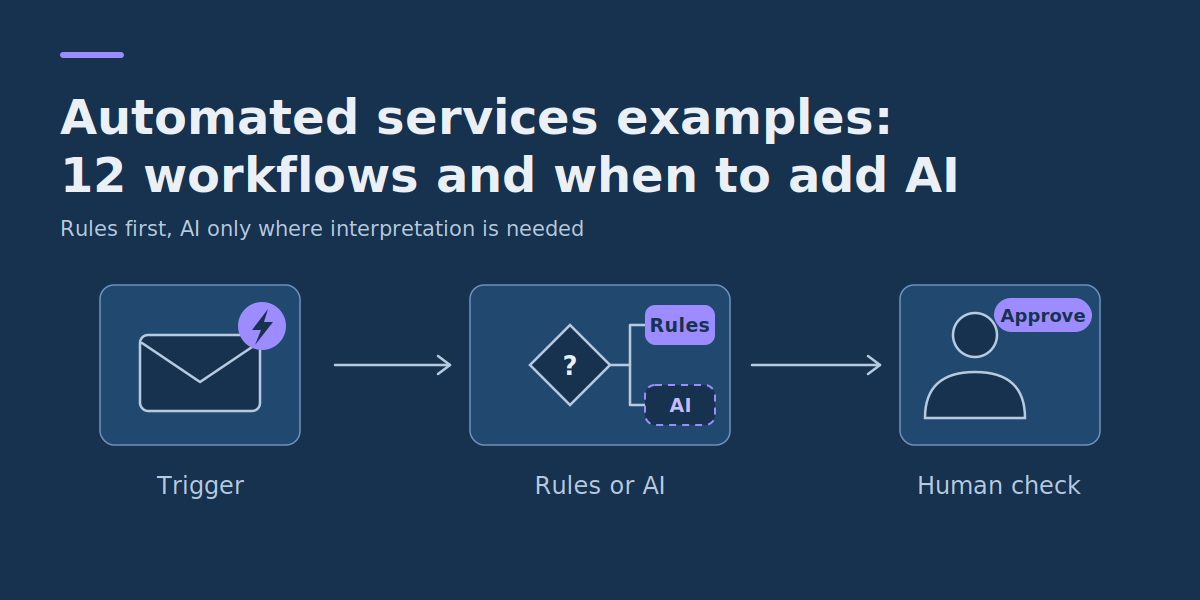
Automated Services Examples: 12 Real Business Workflows and When to Add AI
Automated services use software to complete defined business activities with less repetitive manual work. The most useful automated services examples include acknowledging customer enquiries, sending appointment reminders, following up overdue invoices, routing service requests and preparing recurring reports. These workflows usually combine triggers, business rules, application integrations and human checkpoints.
Quick answer: the most useful automated services examples
- Customer enquiries: capture requests, create records, acknowledge receipt and route unusual cases to the right employee.
- Appointments and scheduling: send confirmations, reminders and rescheduling instructions based on booking events.
- Finance administration: identify overdue invoices, send approved reminders and escalate disputed payments.
- Service operations: assign tasks, update job statuses and notify customers when defined workflow events occur.
- Reporting and back-office work: collect approved data, validate it and prepare recurring operational reports.
For small businesses and operations teams, the important question is not how many tasks could theoretically be automated. It is which recurring workflows are predictable enough to automate safely, valuable enough to justify implementation and clear enough to measure afterwards.
This guide examines 12 realistic service automation scenarios across different industries. They are illustrative workflow designs, not claims about deployments at named companies. Each one identifies the trigger, required inputs, rules-versus-AI decision, system integration, human checkpoint, performance metric and main operational risk.
What Are Automated Services?
Automated services are business activities performed partly or entirely by software according to predefined events, schedules, conditions or decisions. They can support customer-facing services, internal administration or processes that connect several business applications.
A simple automated service has four parts:
- Trigger: something happens, such as a customer submitting a form or an invoice passing its due date.
- Input: the workflow receives the information needed to process the event.
- Decision: business rules or a suitable AI component determine the next permitted step.
- Action: the system updates a record, sends a message, creates a task or requests human approval.
For example, an appointment booking system can send a confirmation when a reservation is created. It needs the booking details, the authorized contact channel and the relevant notification rules. It does not need a large language model to decide whether a confirmation should be sent.
This pattern is common across workflow platforms. Microsoft Power Automate is one example: its documentation covers automated flows, scheduled flows and desktop flows, and describes creating workflows between apps and services to synchronize files, send notifications and collect data. The same design can be implemented in many other tools.
When Should You Use Rules Instead of AI?
Rules-based automation and AI-assisted automation solve different problems. They can also work together, provided their responsibilities are clear.
Use deterministic rules when the decision is explicit. If an invoice is overdue and meets the organization’s reminder policy, a rule can determine the next action consistently.
Consider AI when the input requires interpretation. An unstructured customer email might need to be categorized, summarized or converted into a proposed task description. Even then, the model should not automatically receive authority to approve refunds, change account permissions or make other consequential decisions.
| Decision factor | Rules-based automation | AI-assisted automation |
|---|---|---|
| Input | Structured fields and known conditions. | Text, documents or other inputs requiring interpretation. |
| Example | Send a reminder three days before an appointment. | Suggest a category for an unstructured service request. |
| Decision behavior | Follows explicit logic. | Produces model-dependent outputs that may be incorrect or variable. |
| Validation | Test conditions, boundaries and exception paths. | Evaluate output quality, uncertainty and operational consequences. |
| Maintenance | Update rules when policies or integrations change. | Maintain the integration plus model behavior, evaluation and review controls. |
| Best starting point | Repeatable activities with clear business logic. | Narrow interpretation tasks where simpler methods are inadequate. |
A useful design separates interpretation from authorization. AI may propose that a message concerns a billing dispute, while ordinary workflow rules decide which queue receives it. A qualified employee determines whether any adjustment is appropriate.
The NIST AI Risk Management Framework is voluntary guidance, released on 26 January 2023, intended to help organizations build trustworthiness considerations into the design, development, use and evaluation of AI products, services and systems. Its Govern, Map, Measure and Manage functions offer a practical way to think about accountability, evaluation and ongoing controls when a workflow includes AI. NIST also released a Generative AI Profile in July 2024 and states that AI RMF 1.0 is being revised, so check the page for the current version before citing it in policy documents. If you are weighing generative AI specifically, see our guide to generative AI in enterprise workflows. Not every business automation needs those additional model-related responsibilities. A simpler rules-based implementation is often the better first option.
12 Automated Services Examples Across Business Operations
The following examples show practical ways to automate service workflows without assuming that everything should run unsupervised.
1. Customer Enquiry Intake for a Home-Services Business
A plumbing, electrical or repair company may receive enquiries through website forms, email and telephone messages. Staff often copy contact details into a CRM, acknowledge the request and assign it for follow-up.
- Trigger and input: a new enquiry arrives with contact information, service category, location and a description of the problem.
- Rules versus AI: rules validate required fields, create a lead record and assign known service categories. AI is optional for suggesting a category from free text.
- Integration and human checkpoint: website form to CRM or service-management software. An employee reviews incomplete, ambiguous or potentially urgent requests before committing to a service outcome.
- Metric and risk: measure time to first acknowledgement and the percentage of requests needing manual correction. Risks include duplicate leads, incorrect categorization and failure to escalate urgent issues.
The first version can be entirely rules-based. If the form already asks customers to select a service type, AI classification may add little.
2. Appointment Confirmations and Reminders for a Clinic
A clinic or other appointment-based provider may spend administrative time confirming bookings, contacting customers and handling rescheduling.
- Trigger and input: an appointment is created, changed or cancelled. The system receives an appointment identifier, scheduled time, approved contact details and communication preferences.
- Rules versus AI: rules send approved messages at defined times and suppress notifications for cancelled appointments. AI is unnecessary for ordinary reminders.
- Integration and human checkpoint: scheduling system to a permitted messaging provider. Staff handle sensitive requests, failed deliveries and rescheduling that requires judgement.
- Metric and risk: track successfully processed reminders, rescheduling workload and no-show rates using agreed definitions. Risks include incorrect recipients, outdated appointments and inappropriate disclosure of sensitive information.
Healthcare-related workflows need particular attention to privacy, organizational communication policies and applicable legal requirements. Messages should contain only what is appropriate for the intended recipient and channel. A drop in no-shows after introducing reminders is worth investigating, but should not automatically be credited to the automation without considering other changes.
3. Quote Request Preparation for Cleaning Services
A commercial cleaning company may ask every prospect the same questions about property size, cleaning frequency, location and service requirements.
- Trigger and input: a customer submits a quote request containing service type, property details, frequency and special requirements.
- Rules versus AI: rules check completeness and may calculate a preliminary estimate from an approved pricing structure. AI could summaries unusual requirements but should not invent prices or contractual commitments.
- Integration and human checkpoint: intake form to CRM and quotation software. A manager reviews non-standard jobs and approves binding quotes.
- Metric and risk: measure time to prepare a quote and the percentage of requests needing more information. Risks include incomplete scope, inaccurate assumptions and incorrect pricing.
Automating information collection can add value even when a human still approves the final price. A complicated AI quotation engine may be unnecessary for a service with well-defined packages.
4. Invoice Follow-Up for an Accounting or Service Business
Businesses with recurring invoices may spend time checking overdue balances, drafting follow-ups and recording payment conversations.
- Trigger and input: a scheduled account check finds an unpaid invoice beyond an approved reminder interval. Inputs include invoice ID, outstanding balance, due date, payment status and communication history.
- Rules versus AI: rules determine eligibility and send an approved reminder template. AI is optional for summarizing a complex reply internally.
- Integration and human checkpoint: accounting software to CRM or email. Staff review disputed invoices, failed payments, special arrangements and change requests.
- Metric and risk: track time spent preparing reminders, incorrect reminders and invoice-resolution time. Risks include contacting customers who have already paid, duplicate reminders and inappropriate collection messages.
Check current payment status before every reminder. Sending a message based only on an earlier exported list can trigger unnecessary follow-ups after payment has arrived.
5. Maintenance Request Routing for Property Managers
Property-management teams receive repair requests by email, phone or online portal. Each needs to be logged, categorized and assigned to a suitable provider.
- Trigger and input: a tenant or authorized contact submits an issue with the property reference, description, photos and contact details.
- Rules versus AI: rules check property identity, approved service coverage and predefined categories. AI may suggest a category from text or photographs, subject to validation.
- Integration and human checkpoint: property portal to maintenance-management software. Staff immediately assess safety-related, ambiguous and high-impact requests through a defined escalation process.
- Metric and risk: measure time to assignment, unassigned backlog and incorrect routing. Risks include treating an urgent safety issue as routine or sending personnel without authorization.
Automated intake is often safer than fully automated dispatch here. The software organizes the request while a responsible person keeps control of decisions with significant safety or financial consequences.
6. Client Onboarding for a Digital Agency
Agencies and professional service providers repeat the same onboarding activities: collecting project details, requesting documents, creating workspaces and assigning initial tasks.
- Trigger and input: an authorized project manager marks a signed engagement as ready for onboarding. Inputs include approved scope, contacts, project identifier and deliverables.
- Rules versus AI: rules create project records, tasks and standard document requests. AI may draft an internal project brief from approved materials, with factual verification.
- Integration and human checkpoint: CRM to project management, document storage and communication systems. The project manager verifies scope and approves external access invitations.
- Metric and risk: measure onboarding completion time and missing-information requests. Risks include incorrect access permissions, incomplete scope and sending confidential material to the wrong client.
A useful first release might automate task creation and reminders while leaving permissions and client-facing commitments under human control.
7. Product Return Processing for an Online Retailer
Retail support teams repeatedly collect order numbers, product details and return reasons before deciding what happens next.
- Trigger and input: a return request arrives with an order ID, selected products, reason and supporting information.
- Rules versus AI: rules retrieve the order and identify the applicable review path. AI may suggest a reason category from customer text but must not substitute for the retailer’s legal obligations or approved return policy.
- Integration and human checkpoint: online storefront to order management and support software. Staff assess exceptions, disputes and special cases.
- Metric and risk: measure initial processing time, missing-information rate and correction rate. Risks include rejecting a valid request, processing the wrong order and unauthorized refunds.
Return eligibility can depend on jurisdiction, product type, condition and customer rights. A workflow should not automatically deny a request simply because a narrow internal rule does not cover it.
8. Support Ticket Classification and Routing
A software or service company receives requests about account access, billing, technical defects and general questions, and staff spend time classifying tickets before substantive work begins.
- Trigger and input: a new ticket arrives with a subject, message, account reference and permitted metadata.
- Rules versus AI: rules route structured categories and known account conditions. AI can suggest categories for unstructured messages when it demonstrably improves routing quality.
- Integration and human checkpoint: support platform to ticket queues or CRM. Agents review uncertain, sensitive or escalated classifications and make final customer-service decisions.
- Metric and risk: track correct first assignment, reassignment rate and time to reach an appropriate agent. Risks include misrouting security incidents and delaying urgent requests.
Start by reviewing existing ticket categories. If most requests already carry accurate categories, routing rules may be enough without AI.
9. Employee Onboarding Task Coordination for HR
HR teams coordinate equipment requests, training, account provisioning and onboarding confirmations across several departments.
- Trigger and input: HR confirms an approved start date and onboarding status. Inputs include employee identifier, role, department and approved provisioning requirements.
- Rules versus AI: rules create tasks and request required confirmations. AI is not needed for standard onboarding checklists.
- Integration and human checkpoint: HR system to task management and identity administration. Authorized IT or security personnel approve and implement access according to policy.
- Metric and risk: measure on-time task completion and unresolved onboarding items. Risks include premature account creation, excessive permissions and exposure of personnel information.
Creating an access request automatically is different from granting access automatically. Systems that handle identities and permissions should keep the organization’s approval and authorization controls.
10. Field-Service Job Completion and Invoice Preparation
Repair, inspection and maintenance businesses often need to turn completed job records into administrative documents and draft invoices.
- Trigger and input: a technician submits a completed work order with job ID, labor details, parts used and service notes.
- Rules versus AI: rules validate required fields and prepare an invoice draft from approved rates. AI could summaries lengthy service notes but should not invent work performed or charges.
- Integration and human checkpoint: field-service platform to accounting software. An authorised employee approves exceptions, rate changes and disputed charges before final issue.
- Metric and risk: track time from job completion to approved invoice and the rate of corrected drafts. Risks include duplicate billing, omitted work and incorrect pricing.
A stable catalogue of labor codes, approved prices and parts can support straightforward automation. A generative model is not a substitute for authoritative billing data.
11. Service Contract Renewal Reminders
Maintenance providers, agencies and other service businesses manage contracts with different renewal dates and notice requirements.
- Trigger and input: a contract reaches a defined reminder milestone. Inputs include contract ID, relevant dates, authorized contacts and approved renewal terms.
- Rules versus AI: rules identify upcoming milestones and create review tasks. AI may summaries internal contract documents where appropriate but should not change terms or make legal interpretations.
- Integration and human checkpoint: contract repository to CRM and task management. The account owner verifies terms and approves external communication.
- Metric and risk: measure missed renewal-review milestones and administrative preparation time. Risks include incorrect notice dates, unauthorized commitments and use of outdated contract versions.
The initial automation can simply make sure contracts reach a responsible person before action is due. It does not need to negotiate or renew anything autonomously.
12. Recurring Business Reporting for Operations Teams
Many businesses still prepare weekly or monthly reports by exporting data, copying figures into spreadsheets and emailing summaries.
- Trigger and input: a scheduled reporting period ends. Inputs come from approved accounting, CRM, operational or analytical systems.
- Rules versus AI: rules retrieve data, validate required fields, calculate predefined metrics and generate the report. AI may draft explanatory commentary when the evidence can be checked.
- Integration and human checkpoint: business applications to reporting software or a controlled spreadsheet. A reporting owner reviews discrepancies, incomplete refreshes and commentary before distribution.
- Metric and risk: measure preparation time, refresh success and correction frequency. Risks include stale data, inconsistent KPI definitions and sending information to unauthorized recipients.
Reporting automation suits cases where calculations and source systems are already stable, and an AI-generated narrative should never replace validated metrics. For a deeper look, read our guide to reporting automation benefits and examples.
Before-and-After Automated Services Workflow Table
This table summarizes what changes when these service processes are automated. Use it as a starting point for a workflow review with the employees who currently do the work.
| Workflow | Before automation | After automation | Human responsibility retained |
|---|---|---|---|
| Customer enquiries | Staff copy enquiries into a CRM and send acknowledgements individually. | Valid submissions create records and standard acknowledgements. | Handle urgent, ambiguous and incomplete requests. |
| Appointment reminders | Staff manually check schedules and contact customers. | Approved reminders follow booking events and schedule rules. | Resolve complex rescheduling and sensitive communication. |
| Cleaning service quotes | Staff repeatedly collect standard quote information. | Forms validate details and prepare standard estimates. | Approve non-standard scopes and binding prices. |
| Invoice follow-up | Staff inspect aging reports and write reminders. | Eligible overdue invoices generate approved follow-ups. | Handle payment disputes and special arrangements. |
| Property maintenance | Requests are manually transcribed and assigned. | Records and routine routing tasks are created automatically. | Assess safety, urgency and contractor authorisation. |
| Client onboarding | Project managers recreate the same tasks and document requests. | Approved project status triggers the standard checklist. | Verify scope and grant appropriate access. |
| Product returns | Agents collect order information and check basic criteria. | Valid requests retrieve orders and follow defined review paths. | Resolve disputes and approve restricted financial actions. |
| Support routing | Agents manually classify and assign tickets. | Defined rules or validated suggestions route tickets. | Review uncertain and sensitive cases. |
| Employee onboarding | HR sends individual task requests and tracks completion manually. | Approved onboarding events create tasks and reminders. | Authorise provisioning and review exceptions. |
| Field-service invoicing | Administrators re-enter completed job details. | Validated job records generate invoice drafts. | Approve exceptions and final charges. |
| Contract renewals | Account managers manually track renewal milestones. | Contract dates generate internal alerts and review tasks. | Verify legal and commercial terms. |
| Recurring reports | Analysts copy, reconcile and format data each period. | Scheduled jobs populate reports from approved sources. | Investigate discrepancies and approve distribution. |
These are proposed process designs, not measured improvements from actual implementations. Adjust the level of automation to your organization’s operational controls and the capabilities of the systems you already use.
What Does a Complete Service Automation System Look Like?
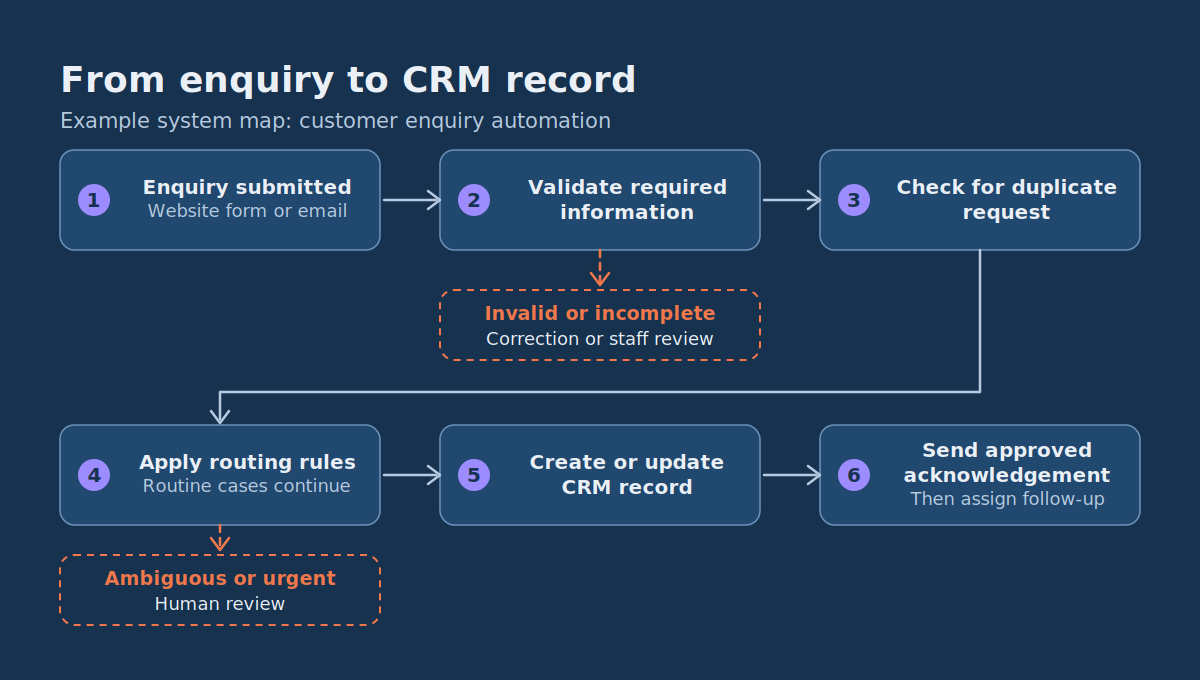
A useful automation system connects the trigger to a controlled result. It also defines what happens when information is missing, an integration fails or a decision cannot be made safely.
Example system map: customer enquiry automation
Customer submits enquiry (website form / email)
        ↓
Validate required information ──(invalid or incomplete)──→ Request correction or route to staff
        ↓
Check for duplicate request
        ↓
Apply routing rules ──(ambiguous or urgent)──→ Human review
        ↓ (routine)
Create or update CRM record
        ↓
Send approved acknowledgement
        ↓
Assign standard follow-up
        ↓
Record final status → Monitor and report
The workflow needs an identifier so that receiving the same event twice does not create duplicate actions. It should also distinguish between a record being created, a message being accepted by a messaging provider and a customer actually responding.
Failures need ownership too. If a CRM connection stops working, an administrator or process owner should be able to identify the failed request and decide whether to retry it or handle it manually. A retry may be safe for a record lookup but unsafe for a financial action unless the system can establish that the action has not already completed.
What Does an Exception Path Look Like?
An exception path defines what happens when the workflow cannot safely continue along its normal route. For a customer enquiry, that might be a missing service location, inconsistent information, a described safety issue or an unavailable CRM connection.
A useful exception record includes:
- The workflow or request identifier.
- The reason automated processing stopped.
- The responsible employee or queue.
- The information available for review.
- The next required action.
- The current status and relevant timestamps.
The reviewer should know exactly what decision is required. A generic notification saying check this, with no evidence, owner or resolution path, creates extra work instead of reducing it.
Where approval is necessary, workflow tools can support a structured process. Approvals are among the scenarios covered in the Power Automate documentation, alongside topics such as data loss prevention policies and troubleshooting cloud flow errors, which are useful references when you design controls and failure handling.
How Much Time or Money Can Service Automation Save?
Benefits depend on actual workload, the effort per case, exception frequency, implementation costs and ongoing maintenance. Calculate the benefit of a specific workflow rather than relying on general promises about efficiency.
Worked ROI Example: Automating Customer Enquiry Administration
Consider a hypothetical service company processing 250 routine enquiries per month. It currently spends five minutes per enquiry recording information, sending acknowledgements and creating follow-up tasks. The proposed workflow reduces average remaining human handling to two minutes per enquiry, plus two hours of monthly review and maintenance. All figures are illustrative assumptions, not results from a customer implementation.
| Input | Illustrative value |
|---|---|
| Monthly enquiries | 250 |
| Current handling time per enquiry | 5 minutes |
| Expected handling time after automation | 2 minutes |
| Additional monthly monitoring and maintenance | 2 hours |
| Illustrative labour value | $30 per hour |
| One-time design, integration and testing cost | $1,500 |
| Recurring software expense | $50 per month |
Monthly capacity released
- Current effort: 250 × 5 minutes = 1,250 minutes = 20.83 hours.
- Effort after automation, including oversight: (250 × 2 minutes) + 120 minutes = 620 minutes = 10.33 hours.
- Net capacity released: 20.83 − 10.33 = 10.5 hours per month.
- Capacity value at $30 per hour: 10.5 × $30 = $315 per month.
- After the $50 software cost: $315 − $50 = $265 per month.
- Simple payback on the $1,500 implementation cost: $1,500 ÷ $265 ≈ 5.7 months.
- First-year net value: (12 × $265) − $1,500 = $1,680.
This is a capacity-value estimate, not a guarantee of cash savings or financial return. Released time only becomes an economic benefit if the organisation can use it productively or reduce actual spend. The estimate also excludes costs such as extra support, implementation delays, variable usage charges, training and unexpectedly high rework. Validate every assumption with an operational pilot before presenting the result as achieved ROI.
How to Measure Results After Launch
Track at least four measures before and after the change:
- Time per completed request: include human processing, correction and supervision.
- Exception rate: the percentage of requests needing additional handling or manual intervention.
- Processing quality: incorrect records, duplicate messages, missing information or other meaningful errors.
- Customer experience: time to useful response and the number of unresolved cases, not simply the number of automatic messages sent.
If automation makes the first acknowledgement faster but increases later corrections, headline time savings can exaggerate the real improvement.
Automated Services Prioritization Worksheet: What Should You Automate First?
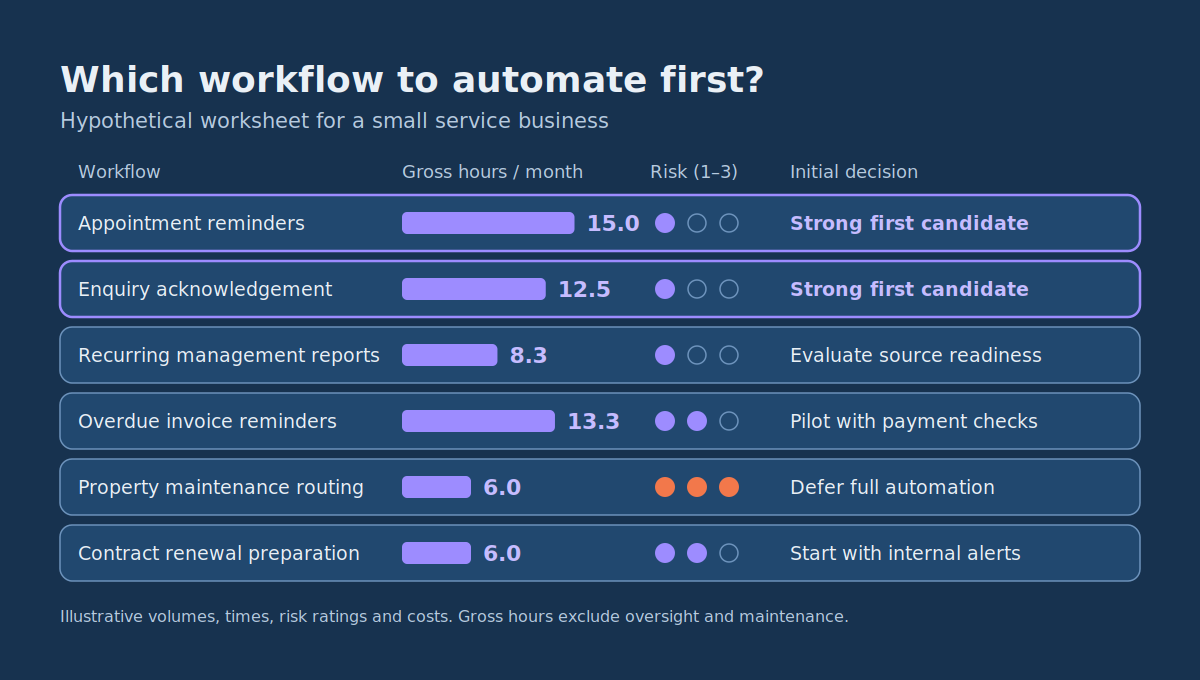
Once you have identified several opportunities, compare them by recurring volume, potential effort reduction, operational risk and integration cost. The worked example below shows six hypothetical opportunities for a small service business. Copy it into a spreadsheet and replace the figures with real measurements.
| Candidate workflow | Monthly cases | Minutes saved per case | Gross hours saved / month | Risk (1–3) | Estimated integration cost | Initial decision |
|---|---|---|---|---|---|---|
| Appointment reminders | 300 | 3 | 15.0 | 1 | $500 | Strong first candidate |
| Customer enquiry acknowledgement | 250 | 3 | 12.5 | 1 | $800 | Strong first candidate |
| Recurring management reports | 20 | 25 | 8.3 | 1 | $1,200 | Evaluate source readiness |
| Overdue invoice reminders | 160 | 5 | 13.3 | 2 | $1,100 | Pilot with payment checks |
| Property maintenance routing | 90 | 4 | 6.0 | 3 | $2,400 | Defer full automation |
| Contract renewal preparation | 60 | 6 | 6.0 | 2 | $1,000 | Start with internal alerts |
All volumes, time estimates, risk ratings and costs are illustrative. Integration cost covers assumed integration work for comparing candidates, not the full cost of design, implementation, testing and training. Gross hours are calculated as monthly cases × minutes saved per case ÷ 60, and do not yet deduct oversight, exception handling or maintenance.
How to Use the Worksheet
- Replace example volumes with observations. Count eligible process occurrences over a representative period. Do not treat every customer contact as automatable if many need individual judgement.
- Measure effort rather than guessing. Sample completed cases and record current handling time, including rework.
- Estimate avoidable work. Separate tasks software can perform from time employees would still spend reviewing or resolving exceptions.
- Classify operational risk. Use 1 for low-consequence, easily reversible errors; 2 for material financial, customer or operational errors requiring controls; 3 for potentially serious safety, legal, security or other consequential errors.
- Estimate integration cost. Inspect the actual APIs, connectors, permissions, data quality and testing needs. A prebuilt connector does not make a project trivial.
- Apply hard exclusions. Do not advance a candidate that cannot meet essential authorization, safety, privacy or business-policy requirements, whatever its estimated savings.
- Shortlist manageable opportunities. Compare what remains by net benefit, setup effort and ease of verifying the result.
The risk scale is an editorial decision aid, not a regulatory classification or formal risk assessment. A high-risk candidate can still benefit from partial automation, such as creating a review task, without automating the consequential decision itself.
Why Appointment Reminders Rank Highly in This Example
The hypothetical reminder process has the largest gross monthly time saving in the worksheet, a modest integration cost and a low risk rating. It also has an easily described trigger and a deterministic action. That recommendation depends on reliable appointment data, permitted communication channels and appropriate privacy controls. If those are missing, another workflow may be a better first project.
How to Implement Your First Automated Service
Keep the first implementation narrow enough to test, measure and operate without unnecessary infrastructure.
Step 1: Choose One Recurring Process
Pick an activity with a clear trigger, stable business rules and enough volume to matter. Confirm that the current process is understood and that someone is accountable for its results. For example, automate standard enquiry acknowledgements rather than every sales conversation.
Step 2: Map the Current Workflow
Record who starts the process and why, which systems hold the required information, what employees currently do, which decisions follow approved rules, which situations need human judgement and what happens when information is missing or wrong. Measure a representative baseline before changing anything.
Step 3: Select the Smallest Suitable Implementation
If your existing tools offer the necessary triggers and actions, begin with a built-in automation feature or workflow platform such as Power Automate. For applications with supported interfaces, API-based integration may be appropriate. Specialized business rules or unsupported systems may call for custom software. Whether any tool is appropriate depends on your applications, licensing, required controls and integration constraints.
Do not add an AI component unless the workflow contains an interpretation problem that ordinary rules cannot handle adequately.
Step 4: Define the Normal and Exception Paths
Specify which cases can proceed automatically and which should stop for review. For an enquiry workflow, the system might automatically acknowledge complete, routine requests, while missing details, inconsistent identifiers and urgent or sensitive descriptions go to staff. Give every exception a responsible owner and a resolution procedure. A queue nobody monitors is not exception handling.
Step 5: Test Before Enabling Automatic Actions
Use controlled test records to verify that:
- Normal inputs produce the expected result.
- Incomplete inputs follow the exception path.
- Duplicate triggers do not cause duplicate actions.
- Failed integrations are detected and handled.
- Unauthorized requests cannot access or modify restricted information.
- Approvals cannot be bypassed.
- Messages and records reach the intended destination.
For potentially consequential actions, consider a pilot in which the system prepares the action and a person approves execution. Remove approval steps only where testing, policy and the consequences of errors justify it.
Step 6: Measure the Pilot and Decide Whether to Expand
Track total handling time, exception rate, rework, customer-facing delays and operating costs. Compare against the original baseline using equivalent definitions and comparable periods, and check whether any improvement simply reflects a change in volume or complexity. Expand only when the workflow is reliable, the owner can support it and the measured results justify the continuing cost.
Common Mistakes When Automating Business Services
- Automating a broken process. If employees follow inconsistent procedures or use conflicting information, reproducing the process in software makes inconsistencies harder to fix. Agree the normal route, required data, decision rules and exception handling first.
- Adding AI to a task with deterministic rules. A language model is rarely needed to compare a due date, create a standard task or send a scheduled reminder. Reserve AI for well-defined interpretation tasks where the extra complexity is justified.
- Ignoring exception handling. A demo that processes only valid cases can hide the most important operational work. Measure how often exceptions occur, how long they take to resolve and who owns them.
- Confusing faster activity with better outcomes. More automatic messages do not prove better service, and more tickets do not prove faster resolution. Choose outcome metrics tied to the workflow’s purpose and include errors and rework.
- Giving automation excessive authority. An application that can read a request does not necessarily need permission to issue refunds, change contracts or grant access to sensitive systems. Use scoped permissions and explicit approvals, and enforce authorization in the business systems themselves.
- Failing to assign ongoing ownership. Integrations break when upstream applications change, credentials expire or policies are updated. Every live workflow needs an owner and an agreed procedure for detecting and resolving failures.
Frequently Asked Questions About Automated Services
Where Should a Small Business Start With Automation?
Start with a frequent, predictable process involving structured information and a low-consequence action, such as standard appointment reminders, internal task creation, enquiry acknowledgements or routine report preparation. Measure current effort and exception frequency before selecting a tool. A small, dependable implementation is a better first milestone than a complex system spanning several departments.
What Is an Example of an Automated Service?
An appointment reminder is a straightforward example. When a valid booking reaches a scheduled reminder point, software checks its status and communication rules, then sends an approved message without an employee preparing it. Staff continue to handle exceptions and sensitive requests.
Do Automated Services Always Require Artificial Intelligence?
No. Many automated services run entirely on events, schedules, conditions and ordinary software integrations. AI may help when the process involves interpreting unstructured emails, classifying text or drafting summaries, and its use should be justified by a measurable need and appropriate quality controls.
What Does a Human Exception Path Mean?
It is the defined route for cases that cannot safely or correctly be completed automatically. The system records why processing stopped, assigns the case to an authorized employee and provides enough information for that person to decide what happens next. An effective path includes ownership, a status and a way to confirm resolution.
How Should Automation Benefits Be Measured?
Compare the complete workflow before and after implementation. Useful measures include handling time, exception rate, error frequency, rework, backlog and recurring operating costs. Account for employee review and maintenance, and when calculating financial return, distinguish released staff capacity from actual cash savings.
When Does Custom Automation Software Make Sense?
Custom development becomes relevant when existing tools cannot support the required integrations, business rules, access controls or user experience without unacceptable workarounds. It may also suit workflows that are central to your own product or operating model. A standard connector-based solution is often preferable when it already meets the requirements reliably. If you are at that point, our overview of custom software development for business workflows explains what to expect.
Automate the Work That Has a Clear Trigger, Owner and Measurable Result
The most valuable automated services are not necessarily the most technically ambitious. They are workflows where software consistently removes repetitive effort while preserving the decisions, permissions and exception handling the business still needs.
Use the 12 examples to identify recurring activities, then apply the before-and-after table and prioritization worksheet to your own operation. Record actual volume, estimate avoidable work, assess risk and validate integration costs before choosing the first project.
Start with rules-based automation when the process follows explicit conditions. Consider AI only when interpretation is genuinely necessary and its output can be evaluated within a controlled workflow.
If your business has a repetitive service workflow that crosses multiple applications or needs custom logic, DataColab can help scope a focused automation project through custom software development for business workflows. A productive first conversation needs only the current process, its approximate monthly volume, the systems involved and the outcome you want to improve.
Pingback:Small Business Data Analytics ROI: Calculation & 3 Examples.
Pingback:Reporting Automation: Examples, Costs & ROI Framework
Pingback:Generative AI Workflows: 7 Enterprise Integration Patterns