
How to Add Live Chat to a Website: Options, Setup and When to Use an AI Bot
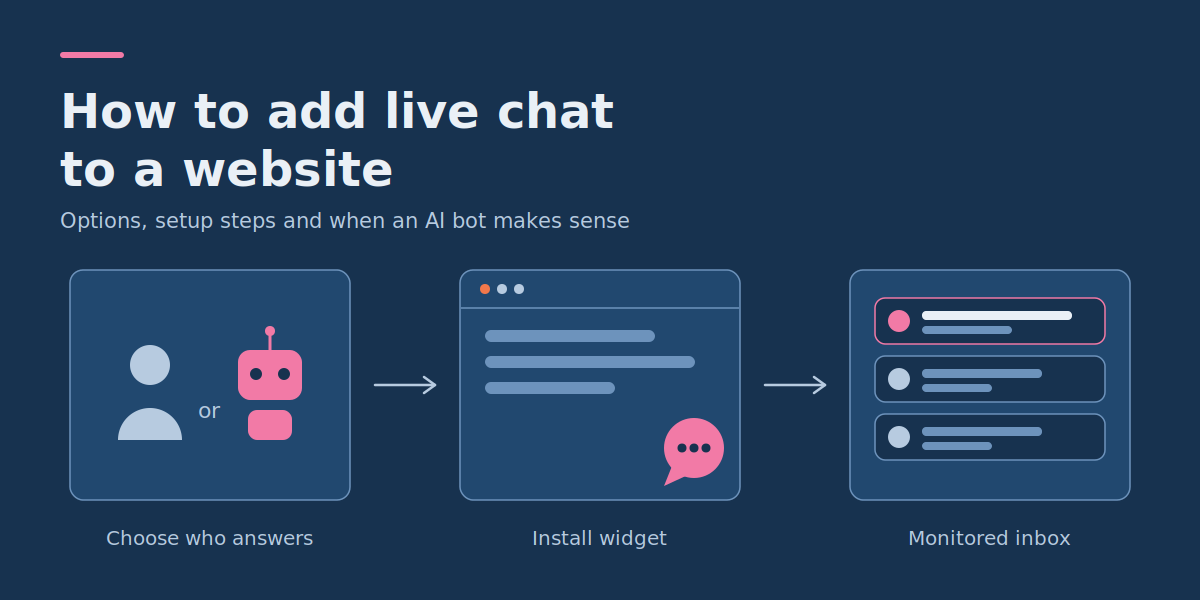
To add live chat to a website, choose a chat provider, create a business account, install its widget with a plugin or website script, and configure how your team receives and answers messages. You can usually do this without building a chatbot or writing custom code.
However, a chat bubble on your site is not customer support by itself. Someone must answer incoming messages, or an automated system must respond appropriately. The key decision is whether your visitors need a real person, a simple automated flow or an AI assistant that answers from your business information.
This guide covers the installation options, a WordPress walkthrough, a setup checklist, an example visitor journey and a human handoff process that small business owners can adapt.
Quick answer: how to add live chat to your website
- Choose who will answer: a human live chat service connects visitors to your team, while a rules-based bot or AI chatbot handles some questions automatically.
- Choose an installation method: most small business sites can use a ready-made live chat widget installed through a plugin or the provider’s embed script.
- Configure availability: set working hours, offline messages and a follow-up process so visitors know when to expect a reply.
- Check privacy before publishing: review what the chat provider collects, which cookies or similar technologies it uses and whether visitor consent is required.
- Test the full conversation: confirm that messages reach the right person, offline enquiries are saved and visitors receive follow-up replies.
Live chat vs chatbot vs AI assistant: which one do you need?
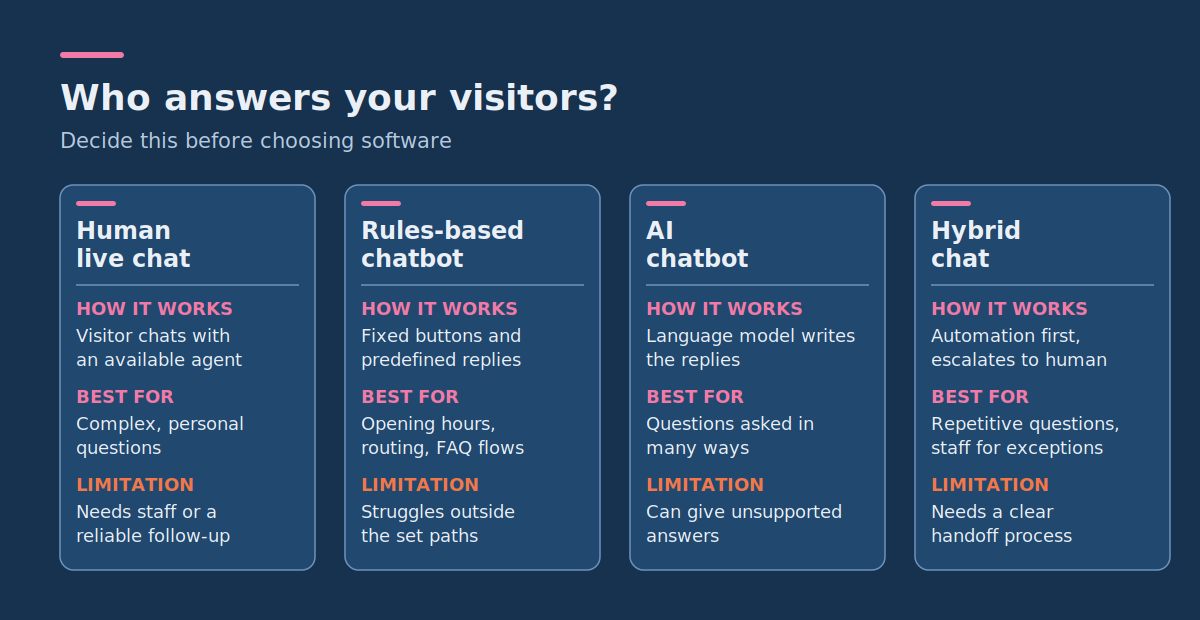
Before choosing software, decide what visitors should experience after opening the chat window. Human live chat, rules-based chatbots and AI assistants can look similar on a website, but they work differently.
| Option | How it works | Best suited to | Main limitation |
|---|---|---|---|
| Human live chat | A visitor exchanges messages with an available team member. | Sales enquiries, complex questions and personalised support. | Requires staff availability or a reliable follow-up process. |
| Rules-based chatbot | Predefined buttons, conditions and responses guide visitors through a fixed conversation. | Opening hours, enquiry routing and predictable FAQ flows. | Struggles when questions fall outside the configured paths. |
| AI chatbot | A language model interprets questions and generates responses, potentially using approved business knowledge. | Questions phrased in many ways and knowledge-rich support. | Can produce incorrect or unsupported answers; needs evaluation and safeguards. |
| Hybrid chat | Automation handles suitable requests and escalates others to a human. | Businesses with repetitive questions and staff available for exceptions. | Needs a clear handoff process and appropriate integrations. |
When human live chat is the better choice
Choose human live chat when customers expect individual attention, or when questions require judgement, negotiation or access to specific customer records.
A professional services website, for example, might receive questions about project scope, pricing and delivery requirements. A staff member can ask follow-up questions and work out what the customer actually needs. A basic live chat widget is enough for this. AI is not a prerequisite.
When a rules-based chatbot is enough
A rules-based chatbot handles short, predictable interactions without generating original answers. A visitor could select:
- Ask about opening hours
- Request a quotation
- Contact customer support
- Leave a message
Each option leads to a predefined message or action. This is easy to review because the business controls every response path, but it becomes less useful when customers ask questions that don’t match those paths.
When an AI chatbot makes sense
An AI chatbot becomes relevant when your website holds substantial information and visitors need help finding or interpreting it. A software company, for example, might have product documentation, integration instructions and troubleshooting articles. Visitors could ask questions in natural language instead of navigating several pages.
Such assistants rely on natural language processing (NLP) to understand what visitors mean. If you want to see what that involves, explore an English-language conversational AI and NLP platform to understand how intent recognition and dialogue management work.
If your main requirement is simply to talk directly with visitors, start with human live chat. A custom AI system adds complexity that may not be worth it for that use case.
How to choose a live chat installation method
There are three practical delivery options for most small business websites: a CMS plugin, a provider-hosted widget script or a custom chat integration.
| Installation method | What you need | When to choose it |
|---|---|---|
| CMS plugin | A supported website platform and permission to install plugins. | Your site uses WordPress or another supported CMS and you want minimal technical setup. |
| Provider widget script | Access to a global script-injection area or your website code. | Your platform allows external scripts and you don’t need a dedicated plugin. |
| Custom integration | Development access, supported APIs or SDKs, and clear requirements. | You need business-specific routing, authenticated customer information or custom AI functionality. |
For a typical small business website, a provider widget is the sensible starting point. It supplies the conversation interface and an agent inbox without requiring you to develop a messaging system.
Step-by-step: add live chat to a WordPress website
WordPress supports chat integrations through plugins. The process is similar across providers, although account linking and widget settings differ. The WordPress Plugin Directory lists over 76,000 free plugins, so you can search it for your chosen provider’s official plugin.
As a concrete example, the steps below use the tawk.to live chat plugin to show how a human chat service can be added without custom JavaScript.
Step 1: Choose your chat service and create an account
Select a provider that supports website chat, an agent inbox, notifications and a suitable way to handle offline messages. Before signing up, check:
- Whether you can add multiple team members
- How visitors are notified when agents are unavailable
- Whether conversations can be accessed from a phone or desktop
- What happens to conversation history
- Which features and usage limits are included in your plan
- What visitor information the provider stores or shares
For tawk.to, create an account and configure a website property in its dashboard. A property represents the website whose visitor conversations you want to manage.
Step 2: Install the WordPress plugin
- Sign in to your WordPress administration dashboard.
- Go to Plugins → Add New.
- Search for Tawk.To Live Chat (or your chosen provider’s plugin).
- Check that the plugin is published by tawkto.
- Select Install Now, then Activate.
- Open the plugin’s settings and connect your account.
- Select the correct website property and chat widget.
- Save the configuration.
If you can’t see the plugin installation menu, your WordPress account or hosting plan may restrict plugin installation. Check your permissions before continuing.
Step 3: Set where the chat widget appears
After connecting the plugin, configure the widget’s visibility. For a simple business website, a useful starting point is to show chat on the contact, services and pricing pages, then decide whether it should appear elsewhere. Some plugins support page-level visibility settings, such as including or excluding selected URLs.
Save your settings and open the public site in a private browser window to check that the widget appears on the intended pages.
Step 4: Sign in as an available chat agent
Open your provider’s agent dashboard and make sure the right team member can receive incoming conversations. Then open the website in a separate browser session, start a chat and confirm the message arrives in the agent inbox. Reply from the dashboard and verify the visitor receives it.
At this point you have tested a real human live chat connection, not just checked that a chat bubble is visible.
How to add a chat widget without a WordPress plugin
Many chat providers supply a JavaScript installation snippet that works on custom websites and supported website builders. The general process is:
- Create an account with your chosen chat provider.
- Add your website as a property or project.
- Open the provider’s widget installation settings.
- Copy the snippet generated specifically for your website.
- Place it in your site’s global code-injection area, following the provider’s placement instructions. On a conventional HTML site this is often just before the closing body tag.
- Publish the change and clear any relevant caches.
- Open the public site and test a real conversation.
Other providers may need a different placement or initialization method, so always use the snippet and instructions for your actual provider.
On WordPress, prefer a supported plugin or maintained script-insertion mechanism over editing active theme files directly. Theme edits can be lost during updates and cause maintenance problems.
If the widget doesn’t appear, check that the script was published, the site is loading the correct configuration and no browser errors are blocking it. A site’s Content Security Policy (CSP) may stop unapproved external scripts from loading.
Where should the live chat widget appear?
The best placement depends on why visitors need help. A floating chat button suits sites where people may need assistance on several pages. An embedded chat element may be better when support relates to one task. Wherever you place it, the widget must not obstruct important controls, especially on mobile.
For a small software services company with a homepage, service pages, pricing, contact and a blog, a sensible starting configuration is:
| Page | Suggested chat behavior | Reason |
|---|---|---|
| Homepage | Show a small, unobtrusive launcher. | Lets visitors ask general questions without interrupting browsing. |
| Services | Offer human assistance for project questions. | Visitors may need clarification before enquiring. |
| Pricing | Make it easy to ask about quotations. | Pricing questions often need individual context. |
| Contact | Offer chat as an alternative to the contact form. | Gives visitors a direct option when staff are available. |
| Blog | Use a compact launcher, or disable chat if it interferes with reading. | Readers may not need immediate help. |
These are suggested design decisions, not measured conversion improvements. Start modestly and use real visitor behavior to decide whether more prominent placement helps. Test on desktop and mobile, and make sure the launcher doesn’t cover navigation, cookie settings or form submit buttons.
Configure availability and after-hours messages
A chat widget should never suggest a person is available when nobody is monitoring the inbox. Define your staffed hours, the relevant time zone and what happens when the last agent goes offline. Many providers offer a widget scheduler for operating hours, but scheduled hours are not the same as actual agent availability.
Example working-hours configuration
For an illustrative small business, assume:
- Monday to Friday: 9:00 AM to 5:00 PM in the company’s timezone
- Saturday and Sunday: no staffed live chat
- Available agents: sales and customer support
- Outside staffed hours: offline message form
- Internal follow-up target: next business day
The follow-up target is a proposed business policy, not a guarantee from any chat platform. Your team must have a workflow that can meet it.
Example online and offline messages
Online greeting: Hi! Have a question about our services? Send us a message and someone from our team will help.
Offline greeting: We’re currently offline. Leave your question and email address, and we’ll aim to reply by the next business day.
Only promise a response time your team can realistically meet, and don’t show a live-agent greeting if the visitor will actually be speaking to a bot. If your provider supports offline tickets, confirm how offline messages become follow-up work, for example whether they can be converted to tickets and answered by email.
Design a clear handoff between chatbots and human agents
When a website combines automation with human support, visitors need to know who is replying and when they are being transferred. A good handoff preserves enough context that the visitor doesn’t have to repeat the whole problem.
Worked example: website enquiry and handoff flow
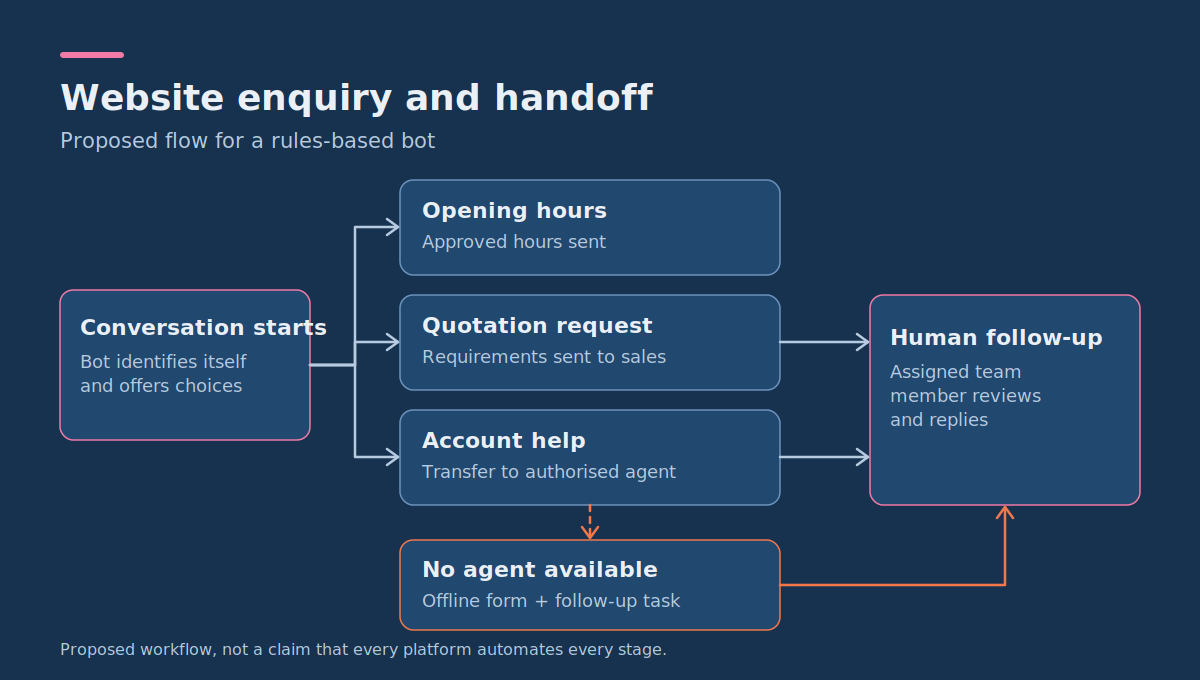
Consider a business that receives three kinds of enquiry: opening hours, project quotations and account-specific support. Assume its rules-based bot can answer opening-hours questions, collect project requirements and route account requests to an authorized support agent.
| Stage | Visitor experience | System or team action |
|---|---|---|
| 1. Conversation starts | “Hi, I’m the automated assistant. What can I help you with?” | Clearly identify the automated responder and offer relevant choices. |
| 2. Visitor chooses opening hours | Receives the approved hours and timezone. | Send a maintained, predefined answer. |
| 3. Visitor asks for a quotation | Receives a request for basic project requirements. | Collect the minimum necessary information and route it to sales. |
| 4. Visitor requests account help | “I can connect you with our support team.” | Transfer to an available authorized agent. Don’t expose private account details before verification. |
| 5. No agent is available | “Our team is offline. Would you like to leave a message?” | Offer an offline form and create a follow-up task. |
| 6. Human follow-up | The visitor receives a relevant reply through the agreed channel. | The assigned team member reviews the enquiry and responds. |
This is a proposed workflow, not a claim that every platform implements all six stages automatically. Confirm the routing, messaging and handoff capabilities of your chosen service.
When should a bot hand off to a human?
Configure escalation when:
- The visitor explicitly asks to speak to a person.
- The bot can’t find a reliable answer in its approved information.
- The request involves a complaint, dispute or sensitive personal matter.
- The visitor needs a business-specific quotation or decision.
- The conversation requires access to protected customer records.
- The automated flow repeatedly fails to solve the problem.
A custom AI chatbot should never fabricate an answer to avoid escalation. The right response is to explain the limitation and offer a human-supported next step.
What privacy and consent settings does website live chat need?
Chat tools can process personal information such as names, email addresses, message contents, device information and conversation history. Some also use cookies or similar technologies for session management, analytics or tracking. Before launch, identify what your provider collects and why.
Check cookies and similar technologies
Requirements differ by jurisdiction. For websites subject to UK electronic privacy rules, the Information Commissioner’s Office explains that consent is generally required for storage or access technologies unless an exception applies, such as technology strictly necessary to provide a service the visitor requested. Purpose matters: a cookie required for a requested chat session and a tracking cookie used for advertising are not necessarily treated the same way.
Don’t assume every chat cookie needs consent, or that every chat cookie is exempt. Inspect your provider’s actual configuration and work out which requirements apply. If non-essential technologies need consent, configure the site so they don’t activate before the visitor has chosen.
Tell visitors how their messages are handled
Provide an accessible privacy notice explaining, as applicable:
- What information is collected through chat
- Why it is needed
- Who processes it, including service providers
- How long conversations are retained
- Whether messages are used for analytics or AI processing
- How visitors can exercise their privacy rights
Collect only what the conversation needs. A general sales question rarely requires a home address, date of birth or ID document. If chats may involve financial, health or other sensitive information, review the requirements carefully and consider directing visitors to a more secure channel.
Build the privacy step into the chat experience
For the earlier small business example, a suitable proposed flow is:
- Show the chat option in line with the site’s consent configuration.
- Link clearly to the privacy notice where visitors can read about chat processing.
- Open the chat when the visitor chooses to interact, subject to applicable cookie and data-processing requirements.
- Ask for an email address only when needed for follow-up.
- Avoid requesting unnecessary personal details.
- Store and retain conversations according to your approved policy.
These steps are a design starting point, not a universal legal-compliance checklist. Legal requirements depend on location, processing purposes and the technology used.
Test your website live chat before publishing
Installing the widget is only the first stage. Live chat must work from the visitor’s first message through to a completed response. Test from a browser session separate from the agent account, and repeat key scenarios on mobile.
Platform-neutral live chat launch checklist
| Test | What to do | Expected result |
|---|---|---|
| Widget visibility | Open each page where chat should appear. | The launcher is visible in the intended location. |
| Mobile usability | Open chat on a narrow mobile screen. | Chat is usable and doesn’t block important controls. |
| Human response | Send a message while an agent is available. | The agent receives it and can reply. |
| Offline handling | Open chat outside staffed hours. | The correct offline message or form appears. |
| Follow-up | Leave an offline message with a test email. | The enquiry reaches the responsible inbox and a reply can be delivered. |
| Bot identification | Start an automated conversation, if enabled. | Visitors can tell they are talking to a bot. |
| Human handoff | Ask the bot for a person. | The configured transfer or offline escalation occurs. |
| Consent | Test before and after choosing privacy options. | Chat technologies behave according to the approved consent rules. |
| Notifications | Send a message while the operator is away from the dashboard. | Notifications reach the right operator. |
| Performance | Compare page behavior with and without the widget. | No unacceptable slowdown or interaction problem. |
If a check fails, fix it before launch. A chat service that displays correctly but loses offline messages isn’t ready for customer enquiries.
Common reasons a live chat widget doesn’t work
The chat bubble doesn’t appear
Confirm the plugin is active or the provider’s script is present on the published site, and check whether page-specific visibility rules hide the widget. If a script is installed but not running, inspect browser errors for blocked network requests or CSP restrictions, and check whether caching or script-optimization tools change how the widget loads.
The widget opens but nobody receives messages
Check that the correct website property is connected, agents have appropriate access and someone is monitoring the inbox. Review availability and notification settings. A visible widget doesn’t mean a human operator is online.
Visitors see unexpected offline messages
Check the provider’s timezone, operating-hours configuration and agent status. A schedule may permit chat at certain hours without guaranteeing an available team member.
Chat works on desktop but blocks mobile controls
Adjust the widget’s position, size or visibility where supported. Test screens with cookie banners, mobile menus and contact forms, since these compete for the same space.
The chatbot answers incorrectly
Review the source information, test the question against the configured knowledge base and check whether the system can acknowledge uncertainty. For retrieval-based AI chatbots, check whether the right document was retrieved and whether the generated answer is actually supported by it. The section on custom AI chatbots below explains how these checks are usually structured.
How to measure whether website live chat is useful
Judge a chat widget by the conversations it helps resolve, not by how often visitors open it. Start with a small set of operational measurements.
| Metric | How to measure it | What it tells you |
|---|---|---|
| Started conversations | Count unique chats started in the reporting period. | How often visitors choose to contact you. |
| First response time | Time from the visitor’s first message to the first meaningful human response. | How quickly available staff engage. |
| Missed or offline enquiries | Count conversations needing delayed follow-up. | Whether staffing and scheduling match visitor needs. |
| Resolution rate | Resolved conversations divided by eligible conversations, using a consistent definition of resolved. | How often enquiries reach an agreed outcome. |
| Handoff rate | Bot conversations transferred to people divided by all eligible bot conversations. | How much work still needs human help. |
| Customer feedback | Optional feedback after suitable conversations. | Whether visitors found the help useful. |
Worked example: a simple monthly chat report
Assume a small business has these hypothetical monthly results:
| Measurement | Illustrative result |
|---|---|
| Started conversations | 80 |
| Resolved during live chat | 45 |
| Resolved through later follow-up | 20 |
| Still unresolved at reporting cut-off | 15 |
| Total resolved | 65 |
| Resolution rate | 65 / 80 = 81.25% |
These figures are illustrative, not a measured business case or industry benchmark. The useful next question is why 15 enquiries stayed unresolved. Were agents unavailable? Did visitors leave without giving a way to reply? Did the system route messages incorrectly? Investigating those causes is worth more than simply showing more chat invitations.
When should you upgrade from basic live chat to a custom AI chatbot?
Adding AI is most defensible when your chat records reveal a repetitive or knowledge-intensive problem that your current setup handles poorly. A business may find its team repeatedly answering questions about service eligibility, technical requirements or product documentation. A well-scoped assistant could help visitors find approved answers while passing unusual or high-impact enquiries to the team.
Before investing, ask:
- Do we have enough repetitive enquiries to justify automation?
- Is the information needed for answers accurate, approved and maintained?
- Can we define questions the bot must not answer on its own?
- Do we need integration with booking, customer records or other systems?
- Can we test responses against realistic visitor questions?
- Will the improvement justify development, integration, maintenance and monitoring costs?
If most enquiries are unique and need a human conversation, improving staff availability or your existing live chat process may be more valuable than building an AI assistant. If the questions involve substantial business knowledge, multiple systems or specialized workflows, custom AI chatbot development may be a reasonable next step. Begin with a defined use case, approved information sources and clear rules for escalating to staff.
How to evaluate a retrieval-based AI chatbot
A retrieval-augmented generation (RAG) chatbot retrieves relevant approved content before generating a response. This can improve relevance but doesn’t guarantee accuracy, so it needs testing. Microsoft’s RAG evaluators documentation describes a useful split:
- Retrieval quality: how relevant the retrieved content is to the visitor’s question.
- Groundedness: whether the response stays aligned with the provided context without fabricating content.
- Relevance: whether the response actually addresses the question.
- Response completeness: whether the answer covers the critical information expected (listed as a preview evaluator at the time of writing).
Microsoft’s tooling scores these on a 1 to 5 scale with a default pass threshold of 3. Whatever tool you use, the principle applies: test retrieval and answer quality separately, so you know whether a wrong answer came from the wrong source or from the response itself.
If you’re still comparing vendors, these NLP chatbot solution providers insights can help you decide what to look for before you commit.
Frequently asked questions
Do I need a plugin to add live chat to my website?
No. A plugin is convenient for supported content management systems, but many providers also supply a JavaScript snippet you can add through an approved integration method. Choose the approach your platform supports and your team can maintain reliably.
Who replies to live chat messages after business hours?
That depends on your configuration. If nobody is staffing the service, the widget should clearly show that live agents are unavailable and offer an offline message form or another contact option. An automated bot can handle approved questions outside business hours, but it shouldn’t pretend to be a human agent.
Do visitors need to consent before using live chat?
It depends on the technologies used, their purposes and applicable laws. Some session technologies may fall under a strictly necessary exception, while non-essential tracking may require prior consent. Chat-related personal data also needs appropriate privacy information and a valid legal basis where data protection law applies. Review your provider’s actual configuration rather than assuming one rule fits every widget.
Can I use live chat and an AI chatbot together?
Yes, provided your system supports the required integration and transfer process. A bot can answer approved routine questions and route other enquiries to human agents. Visitors should know when an automated assistant is replying and have a clear path to further help.
Is a custom chatbot necessary for a small business website?
Usually not, when the main need is direct conversation between visitors and staff. A standard live chat widget or simple rules-based flow may be enough. Custom development becomes more relevant when you need business-specific knowledge retrieval, controlled automation or integration with internal systems.
Start with a working conversation, then improve it
The simplest useful setup is a chat widget connected to a monitored inbox, with clear availability, privacy information and an offline follow-up process. Install that basic workflow first, test it as a visitor and measure whether enquiries are actually resolved. Add rules-based automation when repetitive tasks are clear, and consider an AI chatbot when your questions and business information justify a more capable system.
If you need a chatbot connected to your own knowledge base, internal tools or customer workflows, talk to DataColab about a scoped custom AI chatbot project so the technical requirements, human handoff and evaluation criteria are clear before development begins.