AI Implementation Consulting: 8 Steps from Pilot to Production
AI implementation consulting helps businesses move beyond promising AI demonstrations to reliable, production-ready workflows. A successful implementation requires more than a working model—it needs a structured process that ensures the solution delivers business value, operates safely, and can be maintained over time.
What does it take to move an AI pilot into production?
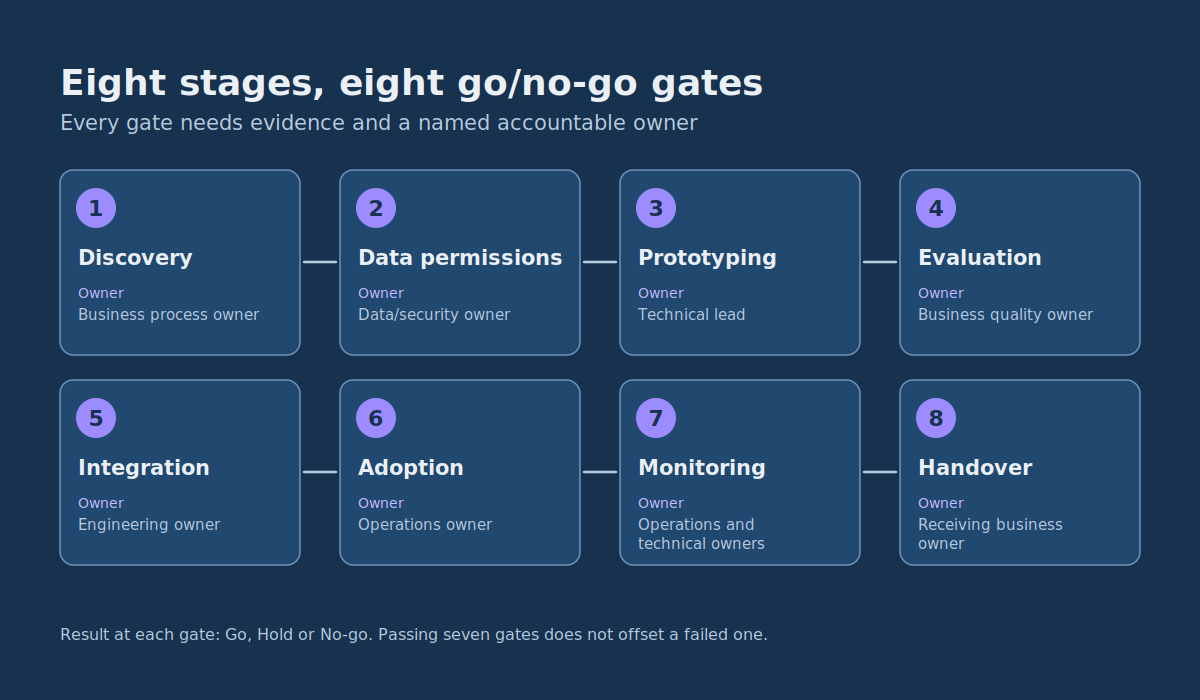
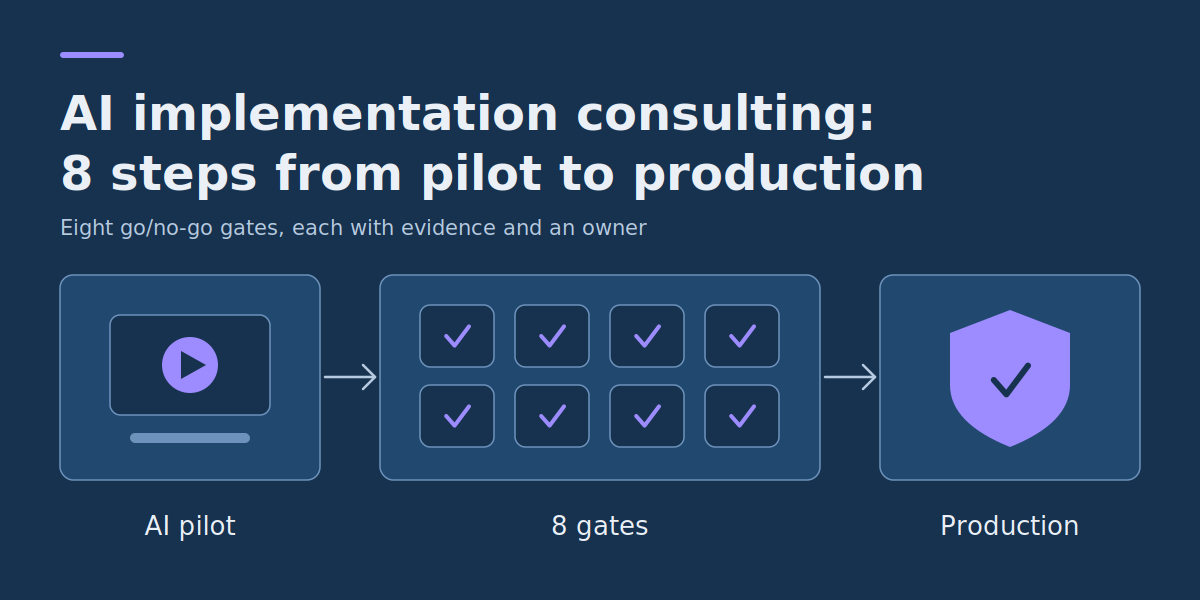
Moving an AI pilot into production involves eight stages: discovery, data permissions, prototyping, evaluation, integration, adoption, monitoring, and handover. Each stage requires clear evidence that the system is useful, safe to operate, and ready for the next step—not just a successful demonstration.
- Successful AI implementation requires more than a working model. It needs approved data access, reliable integrations, trained users, and clear operational ownership.
- Every deployment should pass defined acceptance tests for output quality, workflow performance, security, and failure handling.
- Human review should be designed around the consequences of errors, not added as a vague assurance that someone will check the results.
- A limited rollout needs measurable monitoring conditions and a tested way to return to the previous workflow.
- Implementation is complete only when the business can operate, maintain, evaluate, and safely disable the solution without depending on its original developers.
The transition is rarely just connecting an AI model to an application. A prototype may work with selected examples but encounter missing records, inconsistent permissions, API failures, unexpected inputs, and competing business priorities once real users depend on it.
Treat each stage as a decision about operational readiness. A defined deliverable and a go/no-go decision help teams discover serious gaps before employees begin relying on the system. The process should remain proportionate to the complexity and risk of the project.
What does AI implementation consulting include?
An AI implementation consultant helps turn an approved business use case into a working, supportable application. That includes translating the workflow into requirements, identifying necessary data and permissions, setting acceptance tests, planning integration with existing systems, and agreeing who will approve, operate, and maintain the solution. The work is judged by measurable business results and operational reliability—not by how sophisticated the model looks in a demo.
Strategy and implementation solve different problems. If the business has not yet chosen a valuable opportunity, it should first build an AI strategy roadmap. If the use case is already selected, implementation consulting focuses on the delivery work, quality thresholds, rollout and long-term ownership described below.
1. Discovery: define the workflow and the production outcome
Start with a business process that has already been selected for improvement. Discovery at this stage is not another brainstorming exercise about possible AI applications. It is the work of translating a validated opportunity into an implementable specification.
The implementation team needs to understand what triggers the process, which systems are involved, who performs each action, what an acceptable result looks like, and what happens when an exception occurs.
Consider an illustrative example: a company wants to use AI to extract information from supplier invoices and prepare draft records in its accounts payable system. Employees currently read invoices, enter values, check supplier information, and submit records for approval.
For this example, assume the following starting conditions:
- The company receives approximately 500 invoices per month.
- Manual processing takes an average of eight minutes per invoice.
- Invoices arrive as PDFs, scanned images, and email attachments.
- The accounts payable system supports draft records through an integration interface.
- Employees must approve every draft before it becomes an accepted accounting record.
These are hypothetical planning assumptions, not measured customer results. The business would need to verify them against its own records before using them to justify investment.
The desired solution is deliberately narrow: extract invoice fields, apply validation rules, and prepare a draft for review. It will not authorize payments, change supplier bank details, or independently approve financial transactions.
What should discovery produce?
A useful discovery document contains the current workflow, baseline metrics, proposed automation boundary, dependencies, success measures, and the person accountable for the operational outcome.
For the invoice example, the proposed outcome might be to reduce average end-to-end handling time from eight minutes to five minutes while maintaining mandatory human approval and acceptable extraction quality.
This is different from developing an organization-wide AI strategy. Implementation begins when the team has a defined workflow and needs to deliver it. Discovery here confirms the production requirements rather than repeating use-case selection.
Go/no-go gate: Proceed only if a named process owner confirms the workflow, baseline, measurable target, implementation boundaries, and available budget. If success cannot be defined, return to discovery.
2. Data permissions: establish what the AI may access and retain
Technical access to data does not automatically establish permission to use it in an AI application. Before preparing datasets or connecting external services, determine which information the system needs, who is allowed to access it, and how it will be protected.
For invoice extraction, the application may need supplier names, invoice identifiers, dates, line items, tax information, and totals. It generally does not need unrestricted access to an organization’s accounting database.
Define the minimum necessary access
The implementation team should document:
- Data sources: Which email inboxes, document repositories, APIs, or databases supply inputs?
- Permissions: Which identities can read documents, prepare records, approve changes, or administer the integration?
- Processing boundaries: Whether information is sent to an external model provider and whether that use complies with applicable agreements and organizational policies.
- Retention: Which input documents, outputs, and operational logs are stored, where they are stored, and when they are deleted.
- Test data: Whether representative examples can be used safely for development and evaluation.
- Exceptions: How restricted, malformed, or unexpectedly sensitive documents are handled.
The simplest effective design is often to give the AI application access only to approved documents and a restricted interface for preparing drafts. Final approval stays in the existing business system.
Logging also requires care. Operational records may need to identify the document, system version, decision, and error type without reproducing unnecessary sensitive information.
Go/no-go gate: Do not use live business data until the responsible data, security, and business owners have approved its intended processing, access boundaries, and retention arrangements.
3. Prototyping: prove the narrow task before building a production system
A prototype should answer a specific feasibility question: can the proposed approach perform the required task well enough to justify further engineering?
For the invoice workflow, start with an application that accepts a document and returns a structured record. It does not initially need production database access, a complex user interface, or autonomous workflow execution.
Define a structured output
A draft extraction result might resemble this hypothetical example:
{
  "supplier_name": "Example Supplies Ltd",
  "invoice_number": "INV-1042",
  "invoice_date": "2026-09-15",
  "currency": "USD",
  "subtotal": 1000.00,
  "tax": 100.00,
  "total": 1100.00,
  "status": "pending_review"
}
The example values are invented to illustrate the required format. They are not extracted from a real invoice.
A prototype should preserve a clear distinction between what the model extracts and what deterministic application code validates.
For example, software can check whether the required fields are present, whether dates use an accepted format, and whether the reported subtotal and tax are consistent with the total. The model may interpret the document, but ordinary code should enforce these objective rules.
If the application cannot determine a required value, it should return an explicit missing or unresolved value rather than inventing a plausible replacement.
Avoid premature engineering complexity
At this stage, a small service, a limited document set, and a repeatable evaluation script may be sufficient. There is little value in building multiple background workers, redundant databases, or complex orchestration before the team knows whether the extraction quality is usable.
However, even a prototype needs boundaries. It should not send real payments, overwrite source records, or gain unnecessary write permissions merely because those capabilities might eventually be useful.
Go/no-go gate: Advance when the prototype produces the agreed structured output on representative documents, handles missing values explicitly, and can be tested repeatedly without making uncontrolled business changes.
4. Evaluation: define acceptance tests before approving deployment
A demonstration is not an acceptance test. Showing several correctly processed documents establishes that the system can work, but not how reliably it performs across the intended workload.
Evaluation should use representative examples, predefined scoring rules, and an agreed decision threshold. It must include difficult cases rather than only clean inputs selected by the development team.
Create an evaluation dataset
For the illustrative invoice project, a first evaluation set could contain 150 previously reviewed documents:
- 100 ordinary digital invoices.
- 30 scanned or visually inconsistent invoices.
- 20 exception cases involving missing information, unusual layouts, duplicate invoices, or inconsistent totals.
The accounts payable team supplies or verifies the reference values. Documents used to tune the prototype should be kept separate from the final acceptance set where practical.
This sample is a manageable starting point for finding common problems. It is not sufficient to prove that rare or severe failures are impossible.
Use metrics that reflect the actual task
| Metric | Definition | Illustrative acceptance target |
| Mandatory-field accuracy | Correct required field values divided by all required field values in the test set | At least 98% |
| Fully correct invoices | Documents where every required extracted field matches the verified reference | At least 95% |
| Exception routing | Required exception cases correctly directed to manual review | 100% of predefined critical exceptions |
| Approval enforcement | Drafts requiring employee approval that cannot bypass that control | 100% |
| End-to-end handling time | Average total staff time including review, corrections, and submission | Five minutes or less, compared with an eight-minute baseline |
These thresholds are proposed requirements for the hypothetical project, not standard industry benchmarks or claims about achieved performance. The business should adjust them to its own risk tolerance and costs.
Quality must also be examined by document type. A high overall accuracy score can conceal poor performance on scanned documents or unusual suppliers.
For example, if a model performs well on routine invoices but repeatedly misreads tax values from scans, the team might restrict the first rollout to approved digital document formats and direct other cases to manual processing.
Who validates AI outputs?
The developers should test the technical behavior, but business subject-matter experts must validate the meaning and usefulness of the outputs.
In the invoice example, accounts payable reviewers confirm extracted fields and exception handling. Engineers verify parsing, validation rules, integration behavior, and reproducibility. Security and data owners check the relevant access and processing controls.
Where AI generates answers from retrieved documents, evaluation needs additional checks. Microsoft’s RAG evaluation guidance separates evaluation of the retrieval process (how relevant the retrieved documents or passages are) from evaluation of the generated answer (including groundedness and relevance). These checks help diagnose retrieval-augmented assistants; they do not replace exact-field accuracy tests for an invoice extraction application.
Go/no-go gate: Do not advance because the average output looks convincing. Require the agreed thresholds, documented exception results, and business-owner approval. Failed criteria require correction and retesting.
5. Integration: connect the AI to the real workflow safely
Production integration is often where an otherwise successful prototype encounters its most important practical limitations.
Some workflows need more than a prebuilt connector. Custom software development for business workflows can provide the specific validation layer, application interface, or controlled integration needed when existing tools do not meet the acceptance requirements. Keep that development focused on the missing capability instead of rebuilding systems that already work.
The application must work with the organization’s authentication, databases, APIs, approval processes, error handling, and operating constraints. Correct AI output is only one part of that requirement.
Keep the existing business system as the authority
For invoice processing, the integration might operate as follows:
- A new invoice arrives in the approved document intake system.
- The application retrieves the document using its restricted service permissions.
- The AI extracts the required information.
- Application code validates the structure, required fields, arithmetic, and known supplier identifiers.
- Failed validation sends the document to an exception queue.
- Valid extraction results are used to prepare a draft in the accounting platform.
- An authorized employee reviews the document and approves or rejects the draft.
- The accounting platform remains responsible for recording the approved transaction.
The AI is an assistive component, not the system of record. This distinction is also useful when integrating generative AI into enterprise workflows that already have established controls and approval responsibilities.
Test failures as carefully as successful requests
Integration acceptance tests should cover the behaviors most likely to cause operational damage:
- Duplicate processing: Repeating a request must not create duplicate draft invoices. A stable document or request identifier can support idempotent processing.
- API interruptions: A timeout must not silently discard a document or cause an unverified retry to create a second record.
- Permission failures: The application must not bypass access restrictions when a document or supplier record is unavailable.
- Validation failures: Missing or inconsistent required values must stop the affected transaction from progressing automatically.
- Model or service unavailability: Employees need a documented manual processing route.
- Untrusted document content: Instructions embedded in supplier documents must not be treated as authority to change system behavior or permissions.
The engineering team should also identify how model configuration, prompts, validation logic, and integration changes are versioned so that a faulty release can be traced and reversed.
Go/no-go gate: All critical integration and permission tests must pass. The team must demonstrate that failures cannot bypass approvals, silently lose work, or create duplicate transactions.
6. Adoption: train the people responsible for the output
Employee adoption is not simply an instruction to start using the new interface. People need to understand what the application does, when they should distrust its output, and what action to take when it fails.
A reviewer who sees only a populated invoice form may approve incorrect information without noticing it. A useful interface should make the source document accessible beside the extracted values and clearly indicate missing or inconsistent fields.
Design human review as a specific control
For the illustrative project, use the following review rules during initial rollout:
| Situation | Required action |
| All required fields are present and validation rules pass | Create a pending draft; an employee verifies it against the invoice before approval |
| Required field missing or unreadable | Route to manual review; do not substitute a guessed value |
| Document totals are inconsistent | Block automatic draft submission and flag the discrepancy |
| Unknown supplier or conflicting supplier identity | Require authorized employee verification |
| Possible duplicate invoice | Hold for duplicate investigation |
| Supplier bank details changed | Route through the organization’s separate, approved verification process |
| Payment or final accounting approval requested | Require normal business authorization; AI cannot grant approval |
During this initial deployment, every AI-prepared record receives employee review. Automated confidence scores, where available, can help priorities attention, but an uncalibrated confidence value should not independently authorize high-consequence actions.
The team may later consider reducing review effort for narrowly defined low-risk tasks, but that requires new evidence and an explicit approval decision. The pilot itself does not authorize broader automation.
Test the workflow with actual users
Give reviewers representative invoices and observe the complete process. Measure the time required to inspect values, make corrections, resolve exceptions, and submit records.
If reviewers consistently spend longer checking the AI output than entering the values manually, the system has not demonstrated the intended productivity benefit.
Employees should also know where to report incorrect results, which cases require escalation, and how to continue work when the service is unavailable.
Go/no-go gate: The process owner confirms that reviewers understand the approval boundary, can handle exceptions, and have demonstrated the workflow using realistic tasks.
7. Monitoring: release gradually and define rollback conditions
Passing pre-production tests does not mean an AI system will continue performing identically. Input formats change, documents are updated, model configurations evolve, and external service behavior may change.
Monitoring must therefore cover both the technical service and the business process.
Use a limited rollout with explicit stop conditions
For the invoice example, the company might initially process a small, approved subset of its documents through the AI-assisted workflow while retaining manual processing for everything else.
During that phase, the operational owner should track:
- Extraction accuracy on reviewed production samples.
- Number and proportion of invoices sent to exception review.
- Average staff handling time, including correction effort.
- Duplicate and failed transaction attempts.
- Application response time and service availability.
- Actual processing and operating costs.
- Differences in performance across suppliers and document formats.
Production monitoring should combine operational signals—such as availability, response time, failures, and costs—with sampled output-quality checks and business outcomes. Alerting and investigation procedures make these measurements actionable. A one-time pre-launch evaluation cannot establish that performance will stay acceptable after documents, integrations, or model settings change.
Example monitoring and rollback rules
| Signal | Illustrative trigger | Required response |
| Mandatory-field accuracy | Below 98% on the agreed reviewed production sample | Pause expansion, inspect failures, and retest affected document types |
| Exception rate | Above 20% for two consecutive daily batches | Investigate document changes or processing faults before expanding usage |
| Duplicate transactions | One confirmed duplicate draft caused by the integration | Disable affected automated submission and investigate |
| Approval bypass | Any confirmed unauthorized progression of a draft | Immediately disable the affected workflow and initiate incident handling |
| Service outage | AI extraction or required integration is unavailable | Switch affected documents to the established manual process |
The numerical thresholds are hypothetical operating rules, not published reliability standards. They should be agreed by the organization, with sample sizes and review frequency documented. An incident involving critical approval controls should not wait for a statistical threshold to be crossed.
What does rollback actually mean?
Rollback is not merely restoring an earlier software version. It means returning the business process to a known, operable state.
For invoice processing, a rollback procedure should:
- Stop new AI-generated draft submissions.
- Preserve the status of documents already received or awaiting review.
- Identify uncertain or incomplete transactions and route them to a designated employee.
- Continue intake through the established manual process.
- Restore a previously accepted software configuration when appropriate.
- Rerun the relevant acceptance tests before re-enabling the integration.
The team should rehearse disabling the new workflow before increasing rollout volume. Otherwise, a rollback plan may exist only on paper.
How should AI drift be measured?
Drift means that relevant conditions or system behavior have changed from those represented in the original evaluation. In this workflow, it might appear when a supplier adopts a new invoice layout or the mix of scanned documents increases.
Detect it by retaining an agreed reference evaluation set, reviewing sampled production outputs, and comparing quality across document types and time periods. Rerun acceptance tests after material changes to the model, prompts, extraction logic, or document-processing pipeline.
Not every fall in accuracy is model drift. It could be a broken integration, stale reference data, a change in input quality, or a validation defect. Investigation should identify the actual cause before retraining or replacing anything.
Go/no-go gate: Expand the rollout only when production measurements meet the agreed requirements, critical incidents are resolved, and the team has demonstrated that the fallback process works.
8. Handover: make the business capable of operating the system
AI implementation consulting should end with operational responsibility clearly transferred, not with a demonstration that the software is running.
The handover package should be proportionate to the system, but a production application needs enough information for its new owners to understand, troubleshoot, and control it.
The minimum practical handover package
- Workflow specification: The supported inputs, outputs, restrictions, integrations, and exception routes.
- Evaluation record: Test dataset description, acceptance thresholds, observed results, outstanding limitations, and approval decisions.
- Technical configuration: Application deployment details, dependencies, version information, and secure access procedures.
- Operating runbook: How to investigate failures, pause processing, recover incomplete work, and return to manual operations.
- Monitoring arrangements: Metrics, alert thresholds, review frequency, and responsible people.
- Change procedure: Which changes require renewed evaluation and who approves them.
- Ownership and support: Named contacts for business outcomes, technical reliability, data controls, and user support.
A useful final test is to ask the receiving team to diagnose an intentionally introduced non-destructive test failure and follow the documented fallback procedure. If they cannot do so without the developers directing every step, handover is not complete.
AI risk management continues after launch. The voluntary NIST AI Risk Management Framework addresses trustworthiness throughout the design, development, use, and evaluation of AI systems. Its four core functions—Govern, Map, Measure, and Manage—support ongoing governance, risk assessment, and response. Those functions are not the eight sequential steps in this article; they provide complementary risk-management guidance for planning and operating the solution.
Go/no-go gate: Accept handover only when the named owners have the necessary access, documentation, support arrangements, evaluation results, and demonstrated ability to operate or disable the system.
AI implementation checklist: eight acceptance gates in one place
The following checklist brings the eight stages into a single working artifact. Use it as a project review sheet before advancing to the next stage. Add an owner, evidence link, and decision date to each gate in your own project tracker.
| Stage | Required evidence | Go/no-go decision | Accountable owner |
| 1. Discovery | Approved workflow, baseline, business target, boundaries, and budget | Go only when the outcome and scope are agreed | Business process owner |
| 2. Data permissions | Approved data sources, access permissions, processing controls, and retention rules | No-go if required processing is not authorized | Data/security owner |
| 3. Prototyping | Repeatable prototype with valid outputs and explicit failure handling | Go when the bounded technical approach is feasible | Technical lead |
| 4. Evaluation | Reference dataset, test results, quality thresholds, and reviewed failures | No-go when required acceptance tests fail | Business quality owner |
| 5. Integration | Passing access, duplicate prevention, error recovery, and approval-control tests | No-go while any critical integration control fails | Engineering owner |
| 6. Adoption | Reviewer training, tested exception process, and operational sign-off | Go when users can handle ordinary and exceptional cases | Operations owner |
| 7. Monitoring | Live metrics, defined alert rules, rollout approval, and tested rollback | No-go for expansion if critical alerts or unresolved incidents remain | Operations and technical owners |
| 8. Handover | Runbook, access, ownership, support, and demonstrated operational control | Accept only when the receiving team can operate the system | Receiving business owner |
How to use the checklist
For each stage, record three things: the evidence that supports the decision, the person authorized to approve it, and whether the result is Go, Hold, or No-go.
Go means the acceptance conditions are satisfied. Hold means evidence or corrective work is still required. No-go means a blocking condition prevents the proposed implementation from proceeding as designed.
Do not average away critical failures. Passing seven gates does not compensate for missing data permission or an approval bypass. Some stages may overlap during development, but a production launch must satisfy all applicable controls.
What does a successful AI implementation look like in practice?
For the hypothetical invoice project, a successful implementation would not be judged by the number of documents the model can read in a demonstration.
It would be judged by whether employees can process real invoices with less total effort while maintaining accurate records, appropriate access, mandatory approvals, and a reliable route for exceptional cases.
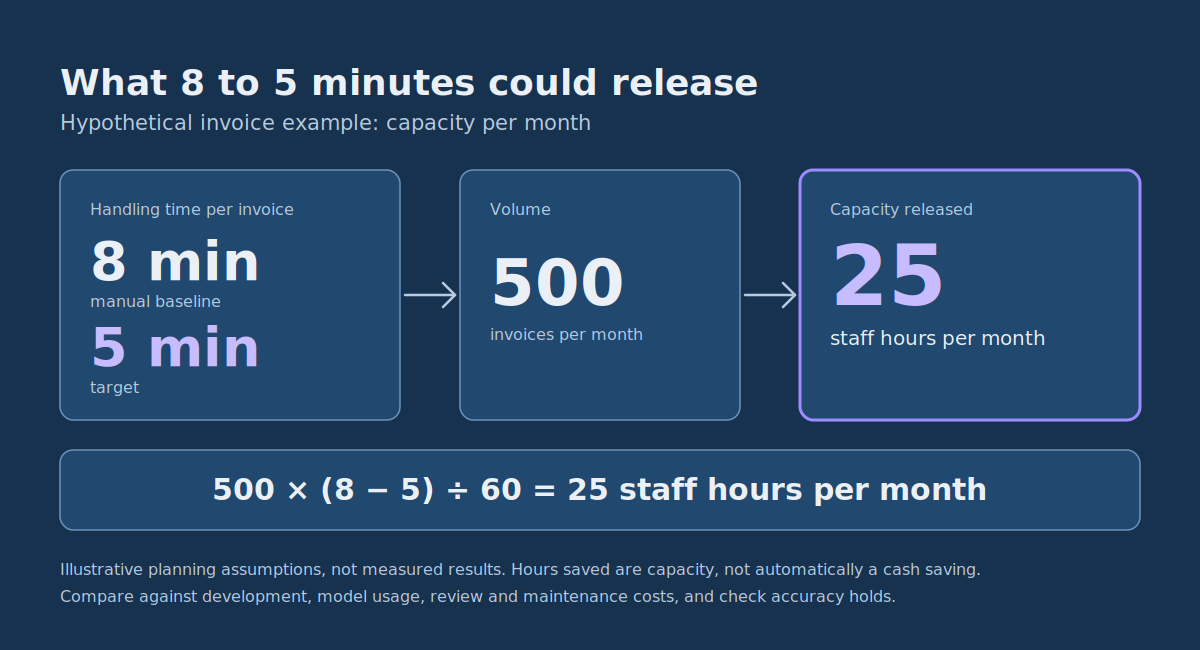
If the pilot demonstrates a reduction from eight to five minutes per invoice across 500 monthly invoices, the estimated capacity released would be:
500 × (8 − 5) ÷ 60 = 25 staff hours per month.
That is a hypothetical capacity improvement, not automatically a cash saving. The business must compare the value of those hours with development, infrastructure, model usage, review, and maintenance costs. It must also check that accuracy and exception handling remain acceptable.
If the measured processing time improves but error correction costs rise, the implementation may need redesign. If the system saves time only on a narrow document category, deploying it to that category may be a better outcome than attempting broad automation.
The right production decision is the one supported by operational evidence, not the one that maximizes AI usage.
Common questions before an AI production launch
What is an AI acceptance test?
An AI acceptance test checks whether the complete application meets predefined business and technical requirements. Unlike a casual demonstration, it uses agreed test inputs, evaluation criteria, thresholds, and a documented pass or fail decision. It should test both output quality and the surrounding workflow, including exceptions, permissions, and failure recovery.
Can human review be removed after the pilot?
Potentially, for selected low-risk activities, but not simply because the model achieved a high average accuracy score. The team must assess the consequences of incorrect outputs, the reliability of automated checks, and whether new acceptance evidence justifies the change. For consequential approvals, maintain the controls required by the organization’s policies and applicable obligations.
Does every AI implementation need a dedicated operations team?
No. A small internal application may be supportable by an existing engineering team and one business owner. The important requirement is clear accountability, not a particular team structure. More complex or consequential applications may justify additional specialists, monitoring, and independent review.
When should an Organization stop an AI pilot?
Stop or redesign when the required data cannot be used appropriately, critical output errors cannot be controlled, integrations are unsafe, costs outweigh the demonstrated benefit, or the business cannot assign responsibility for operation. Stopping a weak pilot is often preferable to turning it into an expensive production dependency.
How long does it take to move an AI pilot into production?
There is no responsible universal timeline. A narrowly scoped tool with clean inputs and an established approval process may move faster than a system requiring new data agreements, multiple integrations, or high-consequence decisions. Estimate delivery against actual work: data approvals, representative evaluation, integration testing, user training, limited rollout, and handover. A short pilot is not a guarantee of a short production project.
What affects AI implementation consulting costs?
Costs depend on the current maturity of the pilot, the number and reliability of integrations, data preparation, security and approval requirements, test coverage, expected usage, and the support needed after launch. Compare the full cost of ownership—including model or infrastructure use, ongoing quality checks, exception review, and maintenance—with measured business benefit. A small, bounded first release can limit unnecessary development.
Move from a validated pilot to a controlled production release
Before scheduling a launch, identify which of the eight implementation gates remain incomplete. Give each one an owner and a specific piece of evidence required for approval. Test the actual business workflow, not only the model, and ensure that disabling the AI component will not interrupt essential operations.
If you have a validated AI use case and need help with production engineering, integrations, acceptance testing, or handover, discuss the workflow with DataColab. Bring your current pilot, the systems it must connect to, and the business outcome you need to demonstrate. That is enough to begin defining a focused delivery scope.
The goal of AI implementation consulting is not simply to put a model into production. It is to deliver a system that creates measurable value, works within the organization’s existing controls, and remains manageable after the initial project is finished.
Pingback:Generative AI Workflows: 7 Enterprise Integration Patterns